
On this page
- What is a UTM link for Google Business Profile?
- Why track Google Business Profile clicks in GA4?
- Which UTM parameters should you use?
- How do you build the UTM link?
- Where do you add the UTM link in your Business Profile?
- How do you see Business Profile traffic in GA4?
- What mistakes break GBP tracking?
- What should you do now?
- Final thoughts
- Frequently asked questions
- Do UTM parameters on my Google Business Profile hurt rankings?
- What utm_medium should I use for Google Business Profile?
- Why don’t GA4 sessions match my Business Profile website clicks?
- Should every location have its own UTM link?
- Can I add UTM tags to my booking or appointment link?
- How long until UTM data shows in GA4?
To track Google Business Profile traffic in GA4, add UTM parameters to the website link on your profile, for example ?utm_source=google&utm_medium=organic&utm_campaign=gbp. Then visits from your profile show up as their own campaign in Google Analytics instead of blending into all your other Google traffic.
Without it, a click from your Business Profile usually looks like any other Google visit. You can’t tell if the profile is pulling its weight.
Maybe you’re the owner doing your own marketing. Maybe you’re the person who got “check the analytics” added to your job. Either way, this takes about ten minutes and it’s free.
Last updated: November 2026
Key takeaways
- UTM parameters tell GA4 exactly where a visit came from. Google says always use utm_source, utm_medium and utm_campaign.
- Using utm_medium=organic keeps profile visits inside GA4’s Organic Search channel.
- Values are case sensitive, so pick one lowercase format and stick to it.
- Edit the link in your Business Profile; Google reviews changes before they go live.
- Compare GA4 sessions with the website clicks number in your profile’s Performance report.
What is a UTM link for Google Business Profile?
A UTM link is your normal website URL with a few tracking tags added to the end. When someone clicks it from your Business Profile, Google Analytics reads those tags and records the visit under the source, medium and campaign you chose.
The tags are just text after a question mark. Your page doesn’t change. Visitors land on the same page they always did.
Google’s Analytics help lists the parameters you can use. The ones that matter for a Business Profile:
| Parameter | What it means (per Google) | Suggested value for GBP |
|---|---|---|
| utm_source | The referrer, e.g. google, newsletter | |
| utm_medium | The marketing medium, e.g. cpc, email | organic |
| utm_campaign | Product, promo or campaign name | gbp |
| utm_content | Used to tell different creatives or links apart | website, booking, menu (optional) |
| utm_id | Campaign ID | optional |
Google says you should always use utm_source, utm_medium and utm_campaign. Missing parameters show up as “(not set)” in your reports.
Why track Google Business Profile clicks in GA4?
Because your profile’s Performance report tells you how many people clicked the website link, but not what they did next. GA4 tells you what happened after the click: which page they landed on, how long they stayed, whether they filled in the form or tapped your phone number.
Put the two together and you get the full picture. Profile view, click, visit, lead.
It matters more right now. Google is testing an AI Overview local pack with no website or call buttons, and a core update is rolling out. If your traffic moves, you want to know whether the profile or the website is the cause. Tagged links let you separate the two.
Which UTM parameters should you use?
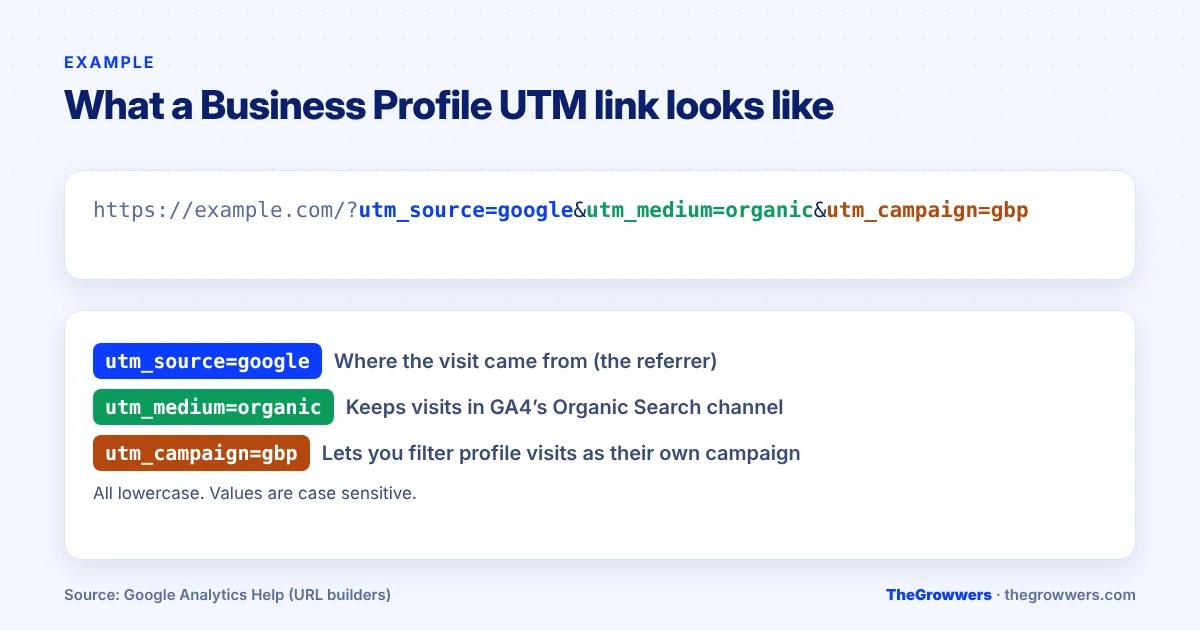
Use utm_source=google, utm_medium=organic and utm_campaign=gbp. That’s the simplest setup that keeps profile visits inside GA4’s Organic Search channel while still letting you filter them out as their own campaign.
Here’s why the medium matters. GA4 sorts traffic into default channel groups using fixed rules, and Google notes the default channel group can’t be edited. Traffic with a medium of “organic” goes into Organic Search. If you invent a medium like “gmb-listing”, GA4 may drop those visits into “Unassigned”, which makes your reports messier, not cleaner.
Two more rules from Google’s help page:
- Values are case sensitive. utm_source=google and utm_source=Google show up as two different sources. Use lowercase everywhere.
- One medium per channel. Pick a naming pattern and don’t change it next month.
Our read? Keep it boring. Boring names are the ones you’ll still understand in a year.
How do you build the UTM link?
Take your full website URL and add the parameters after a question mark, separated by ampersands. If you link to a location page instead of your homepage, tag that URL.
Examples:
- Homepage:
https://example.com/?utm_source=google&utm_medium=organic&utm_campaign=gbp - Location page:
https://example.com/locations/austin/?utm_source=google&utm_medium=organic&utm_campaign=gbp - Multiple locations, same site: add
&utm_content=austin(or the city) so you can split them in GA4.
One warning before you start. If your URL already has a question mark in it, add the UTM tags with an ampersand instead of a second question mark. And always paste the finished link in a private browser window to make sure the page loads.
Where do you add the UTM link in your Business Profile?
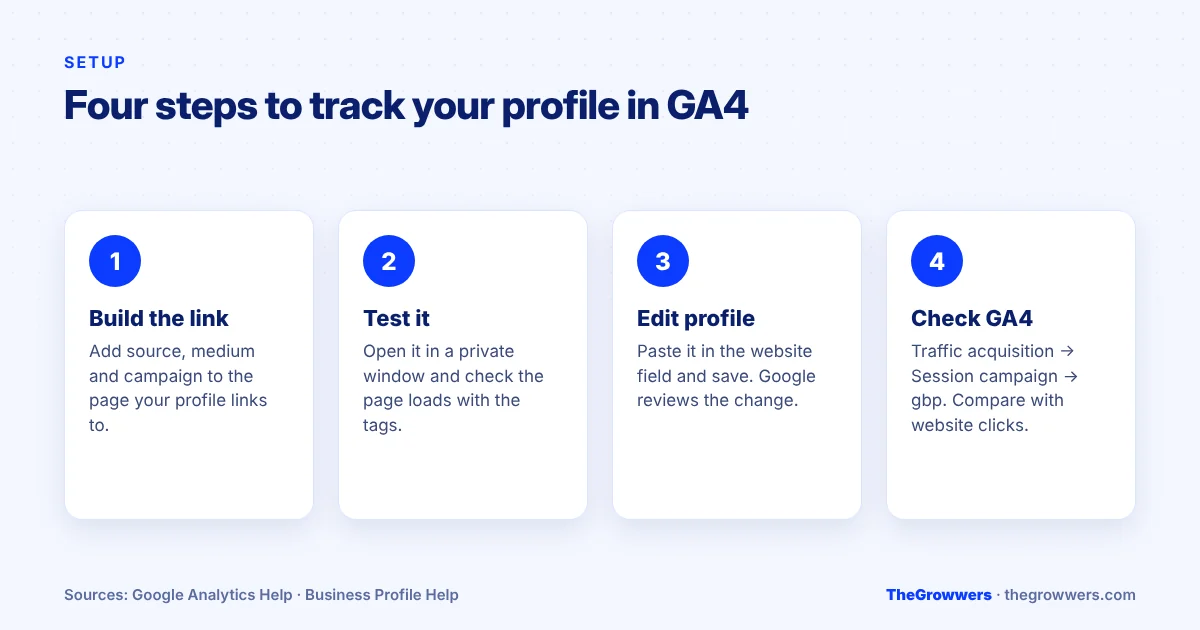
Go to your Business Profile, select Edit profile, find the website field, paste the full tagged URL and select Save. In the Google Maps app, tap Business, then Edit profile.
A few things from Google’s own help page on editing your profile:
- Enter the full URL, including https://.
- Make sure Googlebot isn’t blocked on your site.
- Google reviews changes before they go live, so the new link may not show straight away.
- Some categories can add extra links, like online orders, reservations or appointments. Tag those too, with a different utm_content value (for example utm_content=booking).
Spoiler: editing the website field is a normal change. But any edit goes through review, so make it once, correctly. If you’ve had edits stuck or overwritten before, our post on Google Business Profile suggested edits explains how Google handles profile changes.
How do you see Business Profile traffic in GA4?
In GA4, open Reports → Acquisition → Traffic acquisition and change the primary dimension to Session campaign. Your “gbp” campaign will show its own sessions, engagement and key events. You can also use Session source / medium and look for google / organic, then add a filter for the campaign.
Give it a few days after the link goes live. Then compare:
| Where | What it tells you |
|---|---|
| Business Profile → Performance → Website clicks | How many times people clicked the website link on your profile |
| GA4 → Session campaign = gbp | How many sessions arrived and what they did on your site |
The numbers won’t match exactly. They’re counted by different systems, some visitors block analytics, and Google says profile performance data includes both organic and Google Ads activity. Look at the trend, not a perfect one-to-one match.
What mistakes break GBP tracking?
Most broken setups come down to the same handful of slips. Check these before you trust the data.
- Mixed case. “GBP” one month and “gbp” the next splits your campaign in two.
- A made-up medium. Anything GA4’s channel rules don’t match can land in Unassigned.
- Tagging internal links. Only tag the link on the profile. Never put UTMs on links inside your own website, they overwrite the original source.
- Redirects that drop the tags. If your site redirects http to https or adds a trailing slash, check that the UTM tags survive the redirect.
- Forgetting the extra links. Booking, menu and order links are clicks too.
What should you do now?
- Decide your naming: utm_source=google, utm_medium=organic, utm_campaign=gbp, all lowercase.
- Build the tagged URL for the page your profile links to.
- Test it in a private window.
- Edit your Business Profile website field and save. Repeat for booking or menu links with a different utm_content.
- After a week, check Session campaign in GA4 and compare with website clicks in your Performance report.
- Write down a monthly number so you can spot changes early.
Final thoughts
UTM tags won’t rank you higher. They’ll just tell you the truth about what your profile sends you, and that’s worth more than most “optimization” tips.
If you’d rather have someone set up tracking properly across your profile and website, our local SEO and website SEO teams do this as part of the work. Or book a free consultation and we’ll take a look.
Frequently asked questions
Do UTM parameters on my Google Business Profile hurt rankings?
There’s no Google documentation saying UTM tags on your profile’s website link affect local rankings. They’re tracking parameters that Google Analytics reads. Google’s profile help page only asks that you enter the full URL and don’t block Googlebot. Keep the landing page itself the same.
What utm_medium should I use for Google Business Profile?
Use utm_medium=organic. GA4’s default channel rules put traffic with the medium “organic” into Organic Search, so profile visits stay in the right channel. Then use utm_campaign=gbp to separate them from other organic visits. Custom mediums can end up in the Unassigned channel.
Why don’t GA4 sessions match my Business Profile website clicks?
They’re measured differently. The profile counts clicks on the website link, while GA4 counts sessions that loaded your analytics tag. Ad blockers, consent banners, quick bounces and redirects all create gaps. Google also says profile performance data includes Google Ads activity. Compare trends over time.
Should every location have its own UTM link?
Yes, if you have more than one location. Keep utm_source, utm_medium and utm_campaign the same and add a different utm_content value for each location, like utm_content=austin. That way you can compare locations side by side in GA4 without breaking your main campaign report.
Can I add UTM tags to my booking or appointment link?
If your category lets you add extra links (Google mentions orders, reservations and appointments), you can tag those URLs too. Use the same source, medium and campaign, with a different utm_content such as booking. Test each link in a private window after saving.
How long until UTM data shows in GA4?
Two things have to happen. Google reviews profile edits before they go live, so the new link may take some time to appear. After that, GA4 needs real visits through the tagged link. Check the Session campaign report after about a week for a useful sample.
Sources: Google Analytics Help: URL builders · Google Analytics Help: Default channel group · Google Business Profile Help: Edit your profile