
On this page
- What is Google Business Home?
- What can you do inside Business Home?
- Who can get access to the Business Home beta?
- What this means if an agency manages your profile
- Business Home vs Google Business Profile: what’s the difference?
- Does Google Business Home help your local rankings?
- The risks nobody is talking about
- 1. AI content still has to follow GBP policies
- 2. AI review replies can sound like… AI
- 3. Connecting tools means more people touching the profile
- 4. Don’t create new profiles chasing the invite
- What should you do right now?
- What else is changing in Google Business Profile?
- Final thoughts
- Frequently asked questions
- What is Google Business Home?
- How do I get access to Google Business Home?
- Is Google Business Home available outside the US and UK?
- Does Google Business Home replace Google Business Profile?
- Will using Business Home improve my Google Maps ranking?
- Can an agency use Business Home for client profiles?
- Is Google Business Home free?
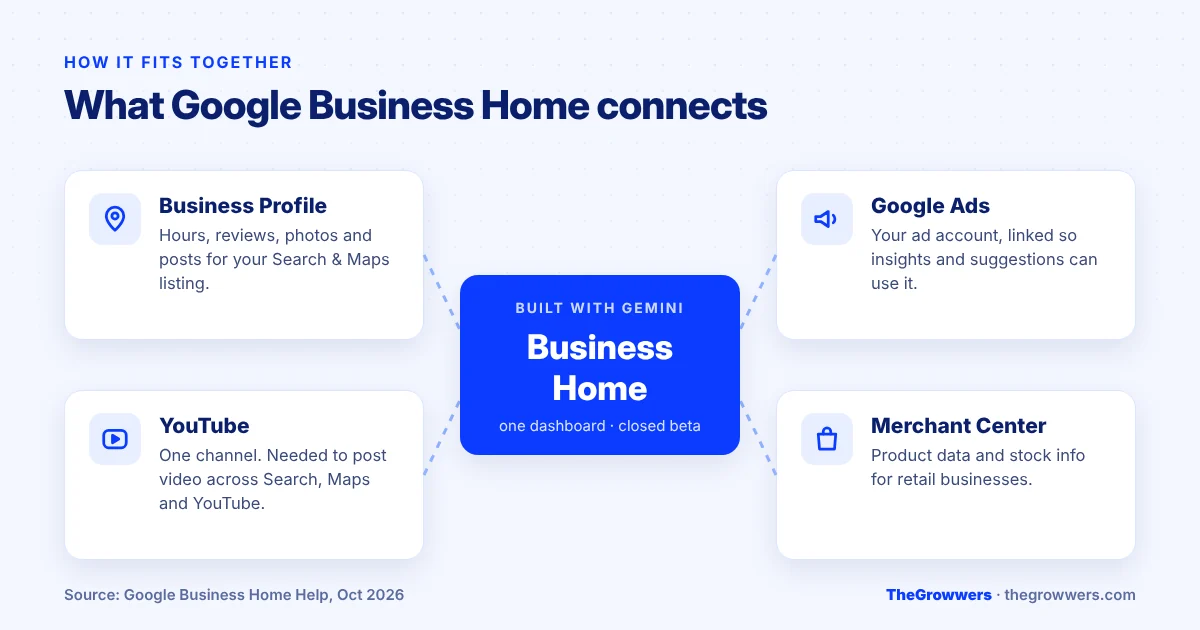
Google Business Home is a new beta dashboard from Google that puts your Business Profile, Merchant Center, YouTube channel and Google Ads account in one place, with Gemini-powered tools on top. Right now it’s invite-only, and only for select business categories in the US and the UK.
If you got an email from Google this week saying “View your business home” and you’re wondering whether to click it, or you saw a screenshot on X and now you’re worried you’re missing out. This post is for you.
Most of the profiles we manage belong to businesses in the US and Canada, so we’ve been watching this one closely. Here’s what Business Home actually is, who qualifies, what it changes for your local rankings (spoiler: not much, yet), and what you should do about it.
Last updated: October 2026
Key takeaways
- Business Home is a closed beta. You can’t sign up. Google invites you by email.
- It connects four tools: Business Profile, Merchant Center, YouTube and Google Ads.
- To qualify you need a verified profile in the US or UK, fewer than 10 locations, and one type of business.
- It does not replace your Google Business Profile. Your listing on Search and Maps works exactly the same.
- No evidence it affects rankings. It’s a management tool, not a ranking factor.
What is Google Business Home?
Google Business Home is a single workspace, built with Google’s Gemini models, where a business owner can manage their Business Profile alongside Merchant Center, YouTube and Google Ads. Google describes it as a “growth partner” that turns your business data into suggested next steps.
The news broke on Search Engine Roundtable on October 22, 2026, after Barry Schwartz got the invite email. But it looks like Google has been quietly rolling it out to some businesses for a couple of months before that.
If you’ve been around GBP for a while, this will feel familiar. Back in the Google My Business days we had a proper dashboard. Then Google moved almost everything into Search and Maps, and you edited your profile right from the search results. Now the dashboard idea is coming back. Just with a lot more AI inside it.
What can you do inside Business Home?
According to Google’s own help page, the beta starts with four core things:
- Create content with AI. AI-written posts and what Google calls studio-quality photo tools, while you keep control over what gets published.
- Manage locations. Update hours, reply to reviews and edit the usual profile details.
- Get growth guidance. A “360-degree” view of the business that Google turns into a list of prioritised actions.
- Message customers. AI-powered messaging through RCS for Business, so people with questions can get answers.
From the screenshots shared so far, the side menu has sections for a Creative Lab, Posts, Reviews, Performance, Locations, a Brand Kit, Connected Tools and Settings. The brand kit is interesting. You save your logo, colours and style once, and the AI uses it for content.
Google also gives one example of where it’s heading: Business Home spotting a real-time surge in demand and helping you push a seasonal offer out across social media. That’s the long-term pitch. Today it’s mostly the profile tools you already know, in one screen.
Who can get access to the Business Home beta?
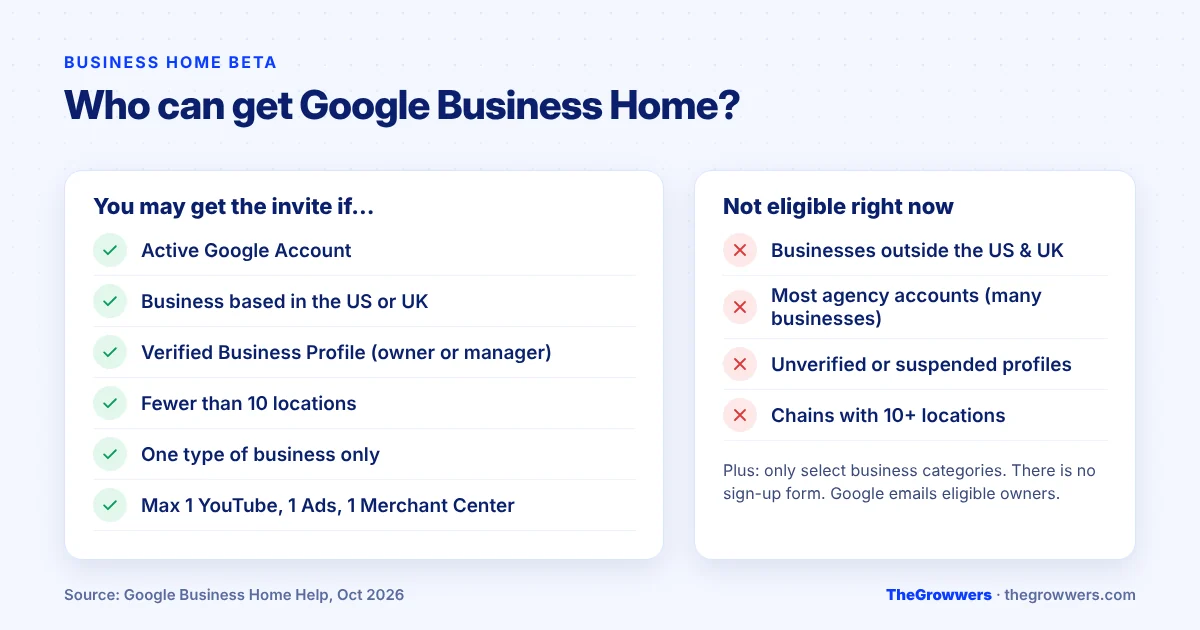
Only businesses Google invites. There’s no form, no waitlist, no “request access” button. If you’re eligible, you get an email and you click View your business home to start.
Google’s listed requirements:
| Requirement | What it means for you |
|---|---|
| Active Google Account | The account that owns or manages your profile. |
| Based in the US or UK | Businesses in Canada, Australia, India and elsewhere can’t get it yet. |
| Verified Business Profile | Owner or manager access to a verified profile. Unverified or suspended ones are out. |
| Fewer than 10 locations | Small businesses and small chains only, for now. |
| One type of business | If your account runs, say, a restaurant and a retail shop, it isn’t supported. |
| One of each connected tool | Max one YouTube channel, one Google Ads account and one Merchant Center account. |
| Policy compliant | Your account and business have to follow Google’s policies, including the policies of the connected tools. |
And on top of all that, it’s only “select business categories.” Google hasn’t published which ones.
What this means if an agency manages your profile
Here’s the honest version: most agency setups won’t see this beta. An agency account usually manages dozens of different businesses, and Business Home is built for one owner running one kind of business.
So if you’re a business owner and your agency is the manager on your profile, the invite (if it comes) will most likely go to you as the owner. That’s one more reason to make sure you are the primary owner of your own profile. Not your old web designer. Not your nephew who set it up in 2019.
Business Home vs Google Business Profile: what’s the difference?
This is where most of the confusion is, so let’s be really clear.
Your Google Business Profile is the listing. It’s what customers see on Google Search and Maps. Your name, reviews, photos, hours, the call button.
Business Home is a dashboard for managing that listing, plus your other Google tools. It’s a new place to do the work. It’s not a new listing and it’s not a new ranking system.
| Google Business Profile | Google Business Home | |
|---|---|---|
| What it is | Your public listing on Search and Maps | A management dashboard |
| Who sees it | Customers | Only you and your team |
| Availability | Everyone, worldwide | Invite-only beta, US and UK |
| Connects to | Just your profile | Profile, Merchant Center, YouTube, Ads |
| Affects rankings? | Yes, the profile data does | No sign of it |
Nothing in Google’s documentation says the old way of editing your profile is going away. You can keep managing it from Search and Maps like you do today.
Does Google Business Home help your local rankings?
No. Not directly, and nobody should tell you otherwise.
Google’s local ranking still comes down to three things: relevance, distance and prominence. Business Home doesn’t change any of that. A profile managed from Business Home and a profile managed from Google Search are the same profile.
Where it could help, indirectly, is consistency. The businesses that win the map pack are usually the ones that keep feeding their profile. Fresh photos, regular posts, replies to every review. If having everything in one screen with AI drafts means you actually do that stuff every week instead of every six months, then yes, you’ll probably see results. But the credit goes to the work, not the dashboard.
The risks nobody is talking about
AI tools make it easy to publish fast. That’s also the problem. A few things we’d watch:
1. AI content still has to follow GBP policies
Google tightened the rules on posts recently. A post with a phone number that doesn’t match your profile can get rejected, and the advertising and solicitation rules were rewritten in October. An AI draft doesn’t know your history with Google. Read every post before it goes live. Every one.
2. AI review replies can sound like… AI
Customers can tell. A reply that thanks “Sarah” for her “wonderful feedback about our exceptional service” when Sarah left a two-star review about a late delivery does more harm than no reply. Use the drafts as a starting point, then make them sound like a human who was actually there.
3. Connecting tools means more people touching the profile
When your Ads account, YouTube and Merchant Center all sit next to your profile, more people on your team (or your agency’s team) may end up with a reason to be in there. More hands, more random edits. Random edits to your name, category or address are a common trigger for a Google Business Profile suspension. Keep a short list of who’s allowed to change what.
4. Don’t create new profiles chasing the invite
It might be tempting to make a fresh profile in a US category just to “get access.” Please don’t. Duplicate or fake listings are a fast way to lose the profile you already have, and there’s no documented way to request access anyway.
What should you do right now?
Whether you get the invite next week or next year, the prep is the same. And honestly it’s stuff you should be doing anyway.
- Check who owns your profile. Go to your profile settings and confirm you’re the primary owner. If you aren’t, fix that first.
- Make sure the profile is verified and healthy. Business Home requires a verified profile. If you’re stuck on verification, our guide on the “no more ways to verify” issue might help.
- Tidy up your connected accounts. One YouTube channel, one Ads account, one Merchant Center. If you have three abandoned YouTube channels, decide which one is the real one.
- Get your brand assets ready. Logo, colours, a handful of real photos of your team and work. The brand kit is only as good as what you feed it.
- Set a posting and review routine. The tool can draft. It can’t decide to show up every week. That part is still on you.
If you do get the invite: go ahead and try it. It’s free, you can still manage everything the old way, and seeing it early gives you a head start. Just turn on the AI features one at a time so you know what’s doing what.
What else is changing in Google Business Profile?
Business Home isn’t the only test going on. A day after it was reported, people also spotted Google testing a brand-new performance report inside Business Profile, with separate sections for engagement, reviews, audience and search trends, plus a list of recommendations. It overlaps a lot with what Business Home shows.
Our read? Google is clearly testing a few different ways to give business owners better data and more AI help. Some of these tests will merge, some will disappear. We’ll keep updating this post as things change.
Final thoughts
Google Business Home is a genuinely interesting step. One dashboard for your profile, ads, YouTube and products, with Gemini doing the first draft. For a small US or UK business that’s busy and behind on its profile, it could make life easier.
But it’s a beta, it’s invite-only, and it doesn’t change how you rank. The businesses that win local search in 2027 will still be the ones with a clean, verified profile, the right categories, real photos, and reviews coming in every month.
Not sure your profile is in good shape? Our local SEO team can audit it and tell you exactly what to fix. Or if something’s already gone wrong, get a free consultation and talk to us directly.
Frequently asked questions
What is Google Business Home?
Google Business Home is a beta dashboard from Google that brings your Business Profile, Merchant Center, YouTube and Google Ads accounts into one place. It’s built with Gemini and gives AI help for creating posts, replying to reviews, editing photos and suggesting next steps to grow the business.
How do I get access to Google Business Home?
You can’t request access. Business Home is a closed beta, and Google sends an invitation email to eligible businesses. If you receive it, select “View your business home” in the email to start. There’s no public sign-up form or waitlist at the moment.
Is Google Business Home available outside the US and UK?
Not yet. Google says the beta is only open to select business categories in the United States and the United Kingdom. Businesses in Canada, Australia, India and other countries should keep managing their profile from Google Search and Maps as normal.
Does Google Business Home replace Google Business Profile?
No. Your Google Business Profile is still the public listing customers see on Search and Maps. Business Home is just another place to manage it, alongside your other Google tools. You can still edit your profile directly from Google Search and Maps.
Will using Business Home improve my Google Maps ranking?
There’s no evidence it does. Local rankings still depend on relevance, distance and prominence. Business Home can make it easier to post, add photos and reply to reviews regularly, and that consistent activity is what helps. The dashboard itself isn’t a ranking factor.
Can an agency use Business Home for client profiles?
Mostly not, for now. The beta is limited to accounts that manage one type of business with fewer than 10 locations, which rules out most agency accounts. If your agency manages your profile, any invite is more likely to reach you as the owner.
Is Google Business Home free?
Business Home itself doesn’t have a listed price, and Google Business Profile is free. If you connect a Google Ads account, your ad spend is still billed through Google Ads as usual, so check your campaigns there before letting any AI suggestion change a budget.