
On this page
- What changed in the Google Business Profile appeal form?
- How do you submit a Google Business Profile appeal now?
- What evidence should you attach to a GBP appeal?
- What if your whole account is restricted, not just the profile?
- How do you appeal more than 10 suspended profiles?
- What do the appeal statuses mean?
- What mistakes make a fast appeal fail?
- What should you do now?
- Final thoughts
- Frequently asked questions
- Is the Google Business Profile appeal form new?
- How many times can I appeal a suspended Business Profile?
- Is evidence required for a GBP appeal?
- How long does a Google Business Profile appeal take?
- Should I create a new profile while my appeal is pending?
- What if my Google account is restricted?
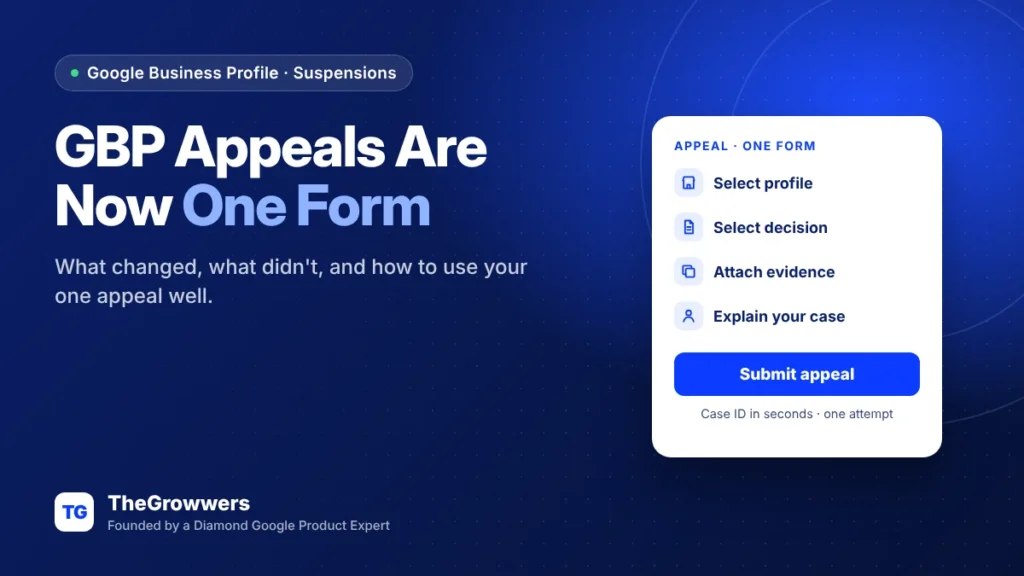
Google Business Profile appeals are now one single form instead of a multi-step funnel. If your profile is suspended, you pick the profile, pick the decision, attach your evidence, explain your case and submit, all on one screen. The Google Business Profile appeal still only gets one shot, so the form being faster doesn’t mean you should rush it.
This was spotted on November 24, 2026. Barry Schwartz reported on Search Engine Roundtable that Ben Fisher shared it on LinkedIn, noting it is “one form now, not a whole funnel” and that you get a case ID in under 30 seconds.
So who is this for? Anyone staring at a suspended or disabled profile right now. Or anyone who manages profiles for clients and wants to know what changed before the next suspension lands.
Last updated: November 2026
Key takeaways
- The Google Business Profile appeal is now a single form, not a multi-step workflow (reported Nov 24, 2026).
- You still only get one appeal per decision. Google’s help page says appeals “can only be submitted once.”
- Evidence is optional but it’s where most appeals are won: registration, license, tax certificate, utility bills.
- If your whole account is restricted, appeal the account first, then the profile.
- Do not create a new profile for the same business while you wait.
What changed in the Google Business Profile appeal form?
The appeal used to walk you through several steps. Now it’s one form. You select the profile, select the decision, add optional evidence and an explanation, tick the confirmation box and submit. According to the LinkedIn post cited by Search Engine Roundtable, the case ID comes back in under 30 seconds.
Google had previously added evidence uploads to the appeal steps. Those uploads now appear to live inside the same single form.
Here’s what did not change, based on Google’s own Fix suspended or disabled profiles help page:
| Part of the process | What Google says |
|---|---|
| Where you appeal | The Google Business Profile appeals tool |
| How many tries | Appeals can only be submitted once |
| Evidence | Optional. Business registration, business license, tax certificates, utility bills (electricity, phone, water, internet) |
| Name and address | Documents should match the profile you’re appealing |
| Decision | Sent by email |
| If denied | You may be able to request an additional review with new evidence |
So the speed is new. The rules are the same.
How do you submit a Google Business Profile appeal now?
Open the appeals tool while signed in to the Google account that manages the profile, choose the suspended profile, choose the decision you’re appealing, attach evidence, write a short explanation and submit. Google emails you the outcome.
Step by step, following Google’s help page:
- Open the Google Business Profile appeals tool and confirm you’re on the right Google account (or select Switch account).
- Select the Business Profile you want to appeal.
- Select the decision you want to appeal. The tool shows the date of the decision, the reason, a link to the policy, whether it can be appealed and its status.
- Upload supporting evidence with Choose file. You can attach multiple files.
- Use the text box to explain why the profile should be reinstated.
- Tick “I’m ready to submit this appeal and confirm that all optional supporting evidence is attached” and select Submit appeal.
That last checkbox matters more than it looks. It’s Google telling you: this is it, no second upload.
What evidence should you attach to a GBP appeal?
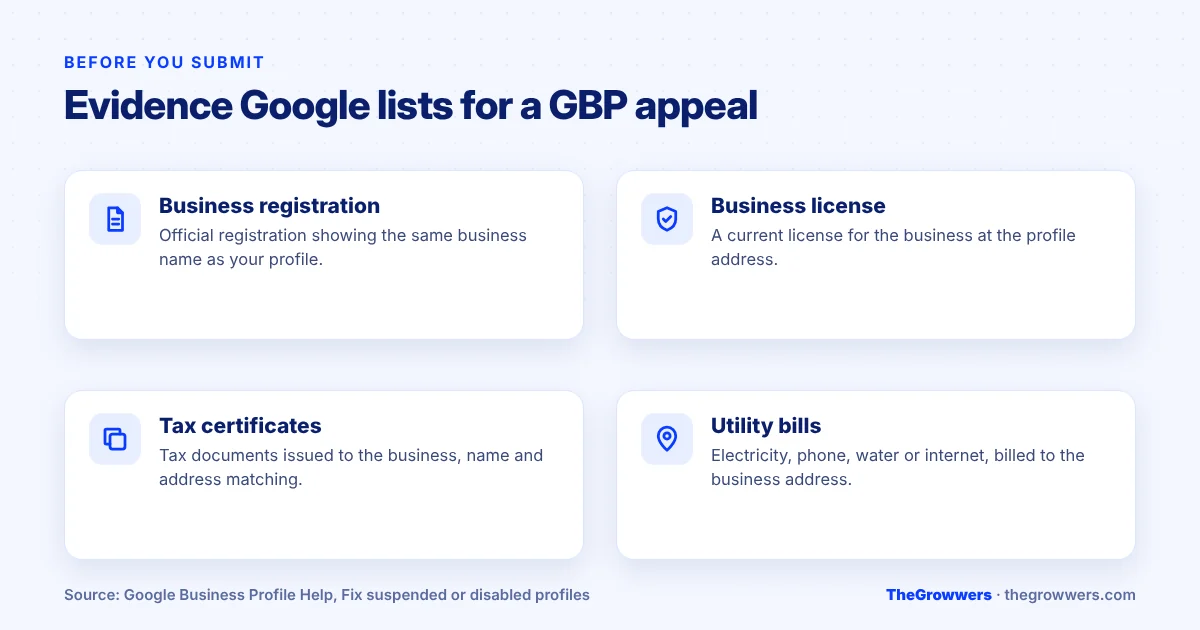
Attach documents that prove the business is real and operates at the address on the profile. Google lists official business registration, a business license, tax certificates and utility bills for the business. The business name and address on every document should match the profile exactly.
Here’s the honest version: “optional” is doing a lot of work in that sentence. Evidence is optional the same way a seatbelt is optional.
A few things TheGrowwers recommends checking before you upload:
- Name match. If your profile says “Smith Plumbing & Drains” and your license says “Smith Holdings LLC”, explain that link in the text box (or fix the profile name first, if it’s not your real-world name).
- Address match. A utility bill for your home won’t help a storefront profile at a different address.
- Readable files. Clear scans, not blurry phone photos at an angle.
- Short explanation. Say what the business is, where customers are served, and what you fixed. Skip the anger. A reviewer reads facts.
What if your whole account is restricted, not just the profile?
Appeal the account first. Google’s help page says an account restriction suspends every profile you manage and blocks you from creating or claiming others. You appeal the restriction from your My accounts page, and once it’s lifted, you appeal each Business Profile suspension.
Order matters here. Appealing a profile while the account itself is still restricted is like fixing the window before you’ve unlocked the door.
| Situation | Where to appeal | What happens next |
|---|---|---|
| One profile suspended | Appeals tool | Email with decision |
| Account restricted | My accounts page | Then appeal each profile |
| 10+ profiles suspended | Appeals tool, bulk option | Attach a spreadsheet of profile IDs plus evidence |
| Appeal denied | Additional review | Add evidence you didn’t send before |
How do you appeal more than 10 suspended profiles?
Use the same appeals tool. When you manage more than 10 profiles, it asks whether you’re requesting bulk reinstatement for 10 or more suspended locations. Select Yes, then attach a spreadsheet with the Business Profile ID of each suspended location plus supporting documents.
One quirk from Google’s help page worth knowing: the status only updates for the profile you selected in the tool, and you only get one email for that profile. So don’t panic when the other locations still look untouched.
What do the appeal statuses mean?
The appeals tool shows one of five statuses on the right side: Submitted, Approved, Not Approved, Can’t be appealed, or Eligible for appeal. “Eligible for appeal” means you haven’t used your one appeal yet. “Can’t be appealed” means that decision is final through this tool.
If you land on Not Approved, Google says it “may be able to do an additional review” where you can add evidence that wasn’t in the original appeal. That’s your second chance. Use it with better documents, not the same ones.
What mistakes make a fast appeal fail?
A faster form makes it easier to submit a weak appeal in a rush. The common ways to lose it: appealing before fixing the guideline problem, sending mismatched documents, creating a new profile while you wait, and treating the text box as a place to vent.
- Not fixing the cause first. Google’s page says to make sure the profile follows all the guidelines before you submit. Keyword-stuffed names, a virtual office address, a service-area business showing an address it shouldn’t (see our service-area vs storefront guide).
- Creating a new profile. Google’s help page is explicit: do not create a new Business Profile for the same business. That’s a duplicate, and duplicates don’t show on Search or Maps.
- Submitting with no evidence. You can. You probably shouldn’t.
- Assuming it was a mistake. Sometimes it is. Sometimes a suggested edit triggered the suspension. Find out which before you write your explanation.
What should you do now?
- Open the appeals tool and read the reason and policy link for your decision.
- Fix whatever broke the guidelines on the profile.
- Collect 2 to 3 documents where the name and address match the profile exactly.
- Write a short, factual explanation.
- Submit once, note your case ID, and wait for the email.
- If it’s denied, prepare new evidence for an additional review.
Final thoughts
The single-form Google Business Profile appeal is a real improvement. Less clicking, case ID in seconds. But the hard part was never the form. It’s getting the profile right and the evidence right on the one attempt you get.
If you’d rather not gamble that attempt, our GBP Reinstatement service is built for exactly this, and you can read why some profiles get recovered faster. Or book a free consultation and we’ll look at your case.
Frequently asked questions
Is the Google Business Profile appeal form new?
The tool isn’t new, but the layout is. As of November 24, 2026, Search Engine Roundtable reported that the appeal is a single form instead of a multi-step workflow, with a case ID returned in under 30 seconds. The rules, evidence types and one-appeal limit are unchanged on Google’s help page.
How many times can I appeal a suspended Business Profile?
Once per decision. Google’s help page says appeals can only be submitted once. If the appeal is denied, Google may let you request an additional review, where you can add evidence you didn’t include the first time. So treat the first submission as if it’s your only one.
Is evidence required for a GBP appeal?
No, it’s optional in the form. But Google lists the evidence that strengthens an appeal: official business registration, a business license, tax certificates and business utility bills. The name and address on each document should match the profile. Skipping evidence makes it much harder for a reviewer to confirm the business.
How long does a Google Business Profile appeal take?
Google doesn’t publish a fixed timeline. The new form gives you a case ID quickly, but that’s only the submission. The decision arrives by email after Google reviews it. You can check the status anytime in the appeals tool, where it shows Submitted, Approved, Not Approved and other statuses.
Should I create a new profile while my appeal is pending?
No. Google’s help page says not to create a new Business Profile for the same business. A second profile is a duplicate, and duplicate profiles don’t show on Google Search or Maps. It can also make your situation harder to untangle. Wait for the appeal decision instead.
What if my Google account is restricted?
Appeal the account restriction first from your My accounts page. A restriction suspends every profile you manage and stops you from creating or claiming profiles. Once the restriction is lifted, submit a separate appeal for each suspended Business Profile through the appeals tool.