
On this page
- What is the ChatGPT business directory?
- Is the ChatGPT business directory the same as the GPT Store?
- Who can get listed in the ChatGPT business directory?
- How do you claim your business in ChatGPT?
- How do you verify your business in ChatGPT Business Hub?
- What is Persona verification, and do you need it?
- What can you edit on your ChatGPT business profile?
- How do you get your business featured on ChatGPT?
- What insights does ChatGPT Business Hub show?
- What is a ChatGPT Business Agent?
- Can an agency manage your ChatGPT business listing?
- Final thoughts
- Frequently asked questions
- Is there a ChatGPT business directory?
- How do I list my business on ChatGPT for free?
- Can I add my local business to ChatGPT if it isn’t listed?
- Does claiming my business make ChatGPT recommend it more?
- How long does ChatGPT business verification take?
- Is the ChatGPT business directory available outside the U.S.?
- Do I need to build a custom GPT to appear in ChatGPT?
The new ChatGPT business directory is called Businesses in ChatGPT. It launched in beta on November 10, 2026, and you claim your listing through Business Hub at chatgpt.com/business-hub. Search your business name, verify by phone, email, website domain or Shopify, then pass an identity check to edit your details and see how often ChatGPT mentions you.
People have been asking ChatGPT “best Italian restaurant near me” and “which CRM should I use” for a while now. Until this week, businesses had no official way to fix what ChatGPT said about them.
That’s what Business Hub changes. It’s free to claim (OpenAI says you don’t need an Ads account), and it works for local businesses and online businesses, with a few catches we’ll cover.
Maybe you searched “ChatGPT business directory”, “ChatGPT for business directory”, “how to list my business on ChatGPT” or “register business on ChatGPT GPT directory”. Same thing. This guide covers all of it.
Last updated: November 2026
Key takeaways
- Businesses in ChatGPT is OpenAI’s new business listing feature, in beta since November 10, 2026. You manage it in Business Hub, from the ChatGPT sidebar or chatgpt.com/business-hub.
- Verification options: business phone (SMS or call), business email, a DNS TXT record on your website domain, or a Shopify store login.
- To publish changes, see insights or build an agent, you also need Persona identity verification. That’s what gives you the blue verified check.
- Insights cover the past 28 days: mentions, website clicks and discovery topics.
- Local stores and restaurants can currently claim only an existing U.S. listing. Business Agents are only for eligible U.S. ecommerce and online service businesses.
- OpenAI says claiming doesn’t guarantee more visibility, and advertising doesn’t influence ChatGPT’s independent answers.
What is the ChatGPT business directory?
The ChatGPT business directory is OpenAI’s Businesses in ChatGPT feature, launched in beta on November 10, 2026. It lets a business claim its ChatGPT listing, keep details like website, description, category and logo current, add product feeds, and see how people engage with it inside ChatGPT. You manage everything in Business Hub.
OpenAI announced it in Introducing Businesses in ChatGPT, pointing to the 1.2 billion people who use ChatGPT each week. When a business shows up in a ChatGPT answer, people can click through to its ChatGPT profile.
Think of it like Google Business Profile, but for ChatGPT. Not the same rules, not the same features. But the same basic idea: claim it before someone else defines you.
| What people search | What it’s officially called |
|---|---|
| ChatGPT business directory / ChatGPT business listing | Businesses in ChatGPT (beta) |
| ChatGPT for business directory / ChatGPT business dashboard | Business Hub |
| ChatGPT business profile | Your business’s ChatGPT profile |
| ChatGPT business chatbot | Business Agent (U.S. only for now) |
| ChatGPT GPT directory / GPT Store | A different thing: custom GPTs, not business listings |
Is the ChatGPT business directory the same as the GPT Store?
No. The GPT Store (what some people call the GPT directory) is where custom GPTs are listed. Businesses in ChatGPT is a business listing: your company’s profile, details, products and insights, managed through Business Hub. You don’t need to build a custom GPT to get listed as a business.
This trips people up, because “register my business on the GPT directory” sounds right. But if your goal is to show up correctly when someone asks ChatGPT about your type of business, Business Hub is the place.
Who can get listed in the ChatGPT business directory?
OpenAI says any eligible business located where ChatGPT is available can claim its business, as long as the required verification is supported there. You must own the business or be authorized to represent it. Availability depends on your location and business type, and local stores and restaurants can currently claim only existing U.S. listings.
Here’s how it breaks down, based on OpenAI’s setup guide:
| Business type | Claim a listing? | Add a new listing? | Business Agent? |
|---|---|---|---|
| Local store or restaurant (U.S.) | Yes, if a listing already exists | Not currently | No |
| Local business outside the U.S. | Depends on location and verification | Not stated | No |
| Online business / ecommerce | Yes, where eligible | May see an “add” option | U.S. only, with a website |
| Shopify merchant | Yes, connect from Business Hub or Shopify admin | Yes, where eligible | U.S. only, if eligible |
| Enterprise customers / advertisers | Through their OpenAI representative | Through their rep | If eligible |
Takeaway: if you’re a U.S. local business, search for your listing first. If it’s there, claim it today. If it’s not, you can’t add it yet, so watch for updates.
How do you claim your business in ChatGPT?
Sign in to ChatGPT, open Business Hub from the sidebar (or go to chatgpt.com/business-hub), search for your business by name, select the matching listing, and confirm the ChatGPT account you’ll manage it with. Then choose a verification method and follow the prompts. OpenAI reviews the claim and emails you a decision.
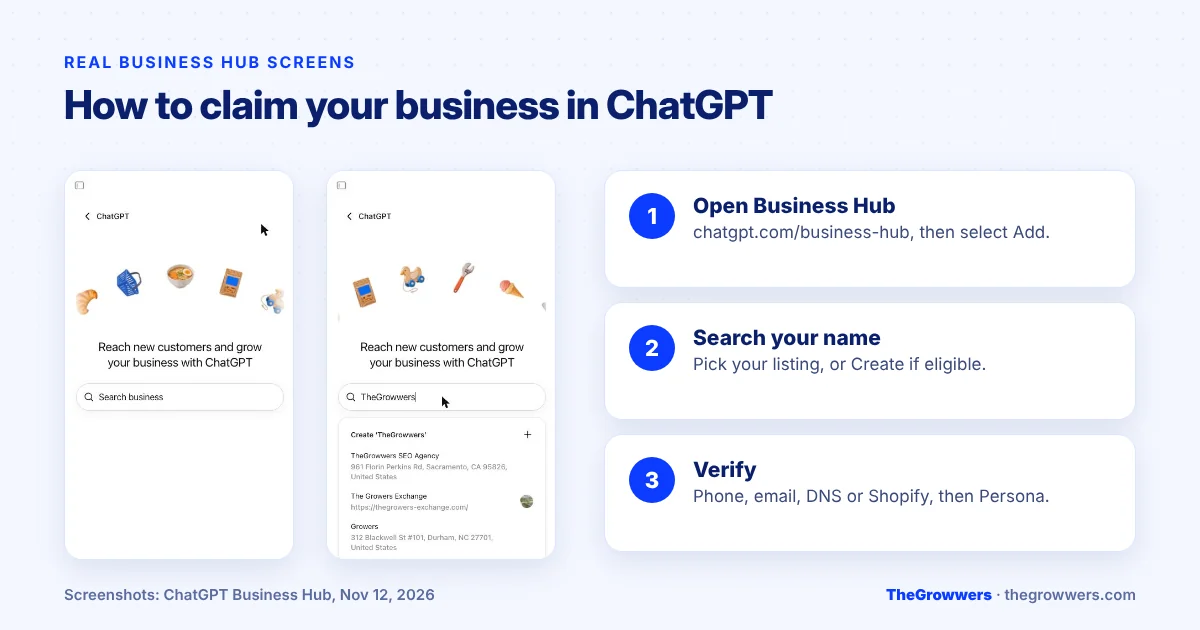
Here’s the step-by-step to register your business on ChatGPT:
- Sign in to ChatGPT with the account you want to manage the business from. A business email account is a good idea.
- Open Business Hub. It’s in the sidebar, or go to chatgpt.com/business-hub. Select Add.
- Search your business name. When we searched for our own name, Business Hub showed our existing listing with its address, plus a “Create” option at the top.
- Select your listing and confirm the account.
- Pick a verification method (see the next section) and enter the code or add the record.
- Wait for approval. OpenAI emails its decision or asks for more info. You can cancel the claim while it’s under review.
- Complete Persona verification so you can actually publish edits and see insights.
Got a “Contact support” button instead of a claim option? OpenAI says that means the listing is locked, so select it and ask for access.
And if someone else already claimed your business, open the profile, select the three-dot menu, then Dispute ownership.
How do you verify your business in ChatGPT Business Hub?
OpenAI offers four claim verification methods, depending on your business: a code by SMS or automated call to your business phone, a code to your business email, a TXT record added to your website’s DNS, or connecting your Shopify store. After the claim is approved, you complete identity verification with Persona.
| Method | How it works | Best for |
|---|---|---|
| Business phone | Choose SMS or automated call, select Get code, enter it | Local businesses with a main phone line |
| Business email | Get a code at the email linked to your business | Businesses with a domain email |
| Website domain | Add the TXT record to DNS exactly, then select Verify domain | Online businesses, agencies managing DNS |
| Shopify store | Connect Shopify and log in to your store | Shopify merchants |
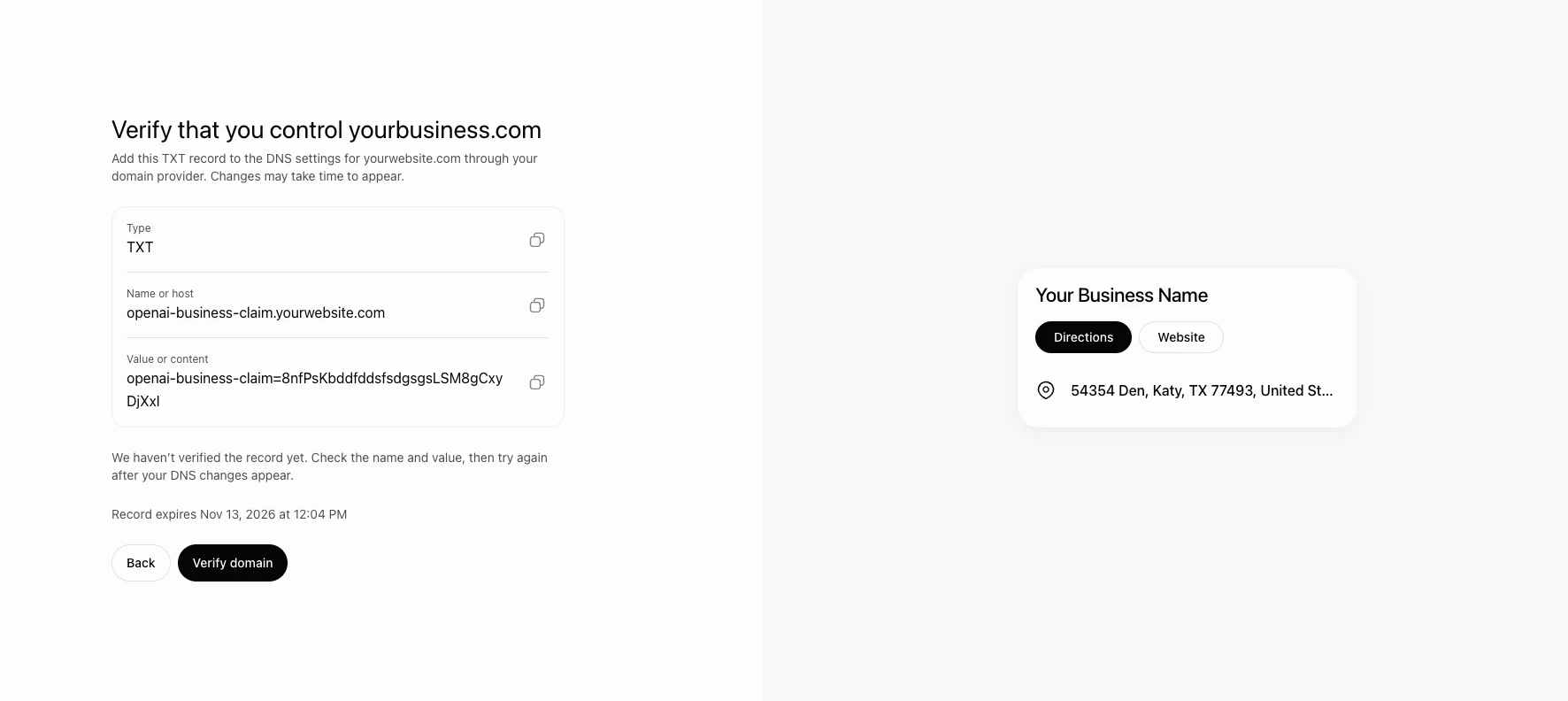
One warning before you start. Make sure the phone number on your listing is one you can actually answer. If your listing shows an old number, the phone option won’t help you. DNS is often the cleanest route for online businesses.
What is Persona verification, and do you need it?
Yes, if you want to do anything useful. Claim approval alone gets you into Business Hub. Persona identity verification is needed to publish changes to your business information, connect a product feed, view insights or create a Business Agent. Approval also gives your profile the blue verified check.
OpenAI says you may need a government-issued ID, business registration information and proof that you’re authorized to represent the business.
If it fails, OpenAI’s advice is to make sure your business name, address and any registration or tax number match your official records. Sound familiar? It’s the same consistency problem that causes headaches in Google Business Profile verification.
Another heads-up: if you use Persona to create a brand-new profile, OpenAI’s approval publishes it automatically. There’s no separate publish step, so get your details right first.
What can you edit on your ChatGPT business profile?
Once your claim and Persona verification are approved, you can update your website, business description, product or service category, logo, delivery policy and return policy, and add a cover photo and other optional details. Sellers can connect a product feed, including a Shopify feed or a CSV, to share prices and availability.
OpenAI reviews and publishes changes, so they can take time to show. And ChatGPT may still use other sources when it answers questions about your business.
That last line matters a lot. Your profile isn’t the only thing ChatGPT reads. Our read? Your website, your reviews and your Google Business Profile still need to say the same thing as your ChatGPT profile.
How do you get your business featured on ChatGPT?
There’s no button to get featured. OpenAI says claiming your business lets you manage your information but doesn’t guarantee more visibility or give you control over ChatGPT’s independent recommendations. It also says advertising doesn’t influence those answers. What you can control is accurate, complete information everywhere ChatGPT might look.
So here’s what we’d focus on to improve your chances of being mentioned, for local and online businesses alike:
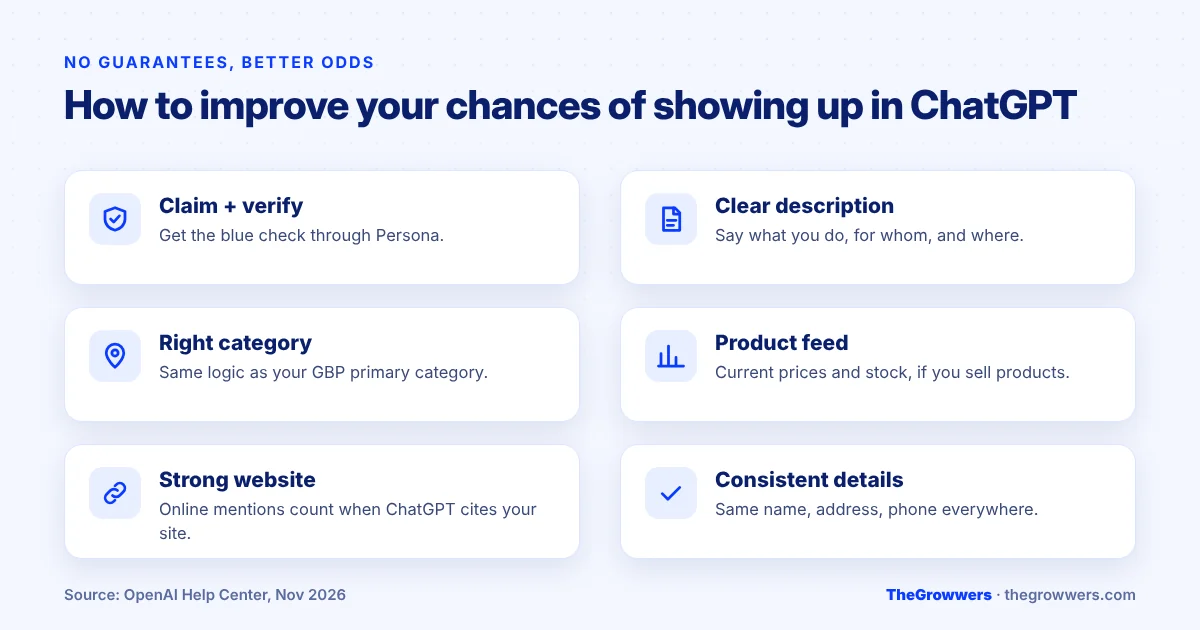
- Claim and verify your ChatGPT listing, with the blue check.
- Write a clear description that says exactly what you do, who for and where. Plain words, no keyword stuffing (it has to follow the Businesses in ChatGPT policy anyway).
- Pick the right category, the same logic as choosing a Google Business Profile primary category.
- Connect a product feed if you sell products, so prices and stock are current.
- Keep your website strong. For online businesses, OpenAI counts a mention only when ChatGPT references your website. Pages that answer real questions clearly are what get cited.
- Keep your Google Business Profile and citations consistent. Same name, address, phone and hours everywhere.
TheGrowwers recommends treating ChatGPT visibility as part of your local SEO, not a separate project. The basics that help you in Google tend to help here too, and our website SEO work is built around pages that answer questions clearly.
What insights does ChatGPT Business Hub show?
Business Hub shows aggregate activity over the past 28 days: mentions, website clicks and discovery topics. You never see individual prompts or conversations. A blank metric doesn’t necessarily mean zero; it can mean activity hasn’t reached the reporting threshold or data is still being collected.
| Metric | What it counts |
|---|---|
| Mentions (online business) | When ChatGPT references your website. The brand name alone doesn’t count. |
| Mentions (local business) | When ChatGPT shows a result for your location, even if nobody opens it |
| Website clicks | Clicks through to your website from ChatGPT |
| Discovery topics | Common themes in answers that mentioned or cited you, not individual questions |
Search Engine Roundtable noted that the clicks tooltip says clicks don’t confirm website visits or conversions. So treat it as a directional number and check your own analytics too.
What is a ChatGPT Business Agent?
A Business Agent is an optional assistant you build in Business Hub that answers customer questions about your products and policies, using information you provide. Customers can choose to chat with it from your profile, in a clearly labeled conversation. It’s available only to eligible U.S. ecommerce and online service businesses with a website.
Right now it can explain products and policies and link to your website. OpenAI says it can’t complete purchases, make bookings or check a customer’s order. You can also sponsor it as the destination for ChatGPT Ads, and sponsored placements are labeled.
You don’t need an agent to claim your business, and you don’t need to advertise either. Those are separate.
Can an agency manage your ChatGPT business listing?
Yes. The admin who claimed the business can add teammates in Business Hub and give an agency access to manage the business or its agent. Each person uses their own ChatGPT account. OpenAI says not to forward a personal claim invitation to give someone access.
If you have several brands or locations, note this: each brand is managed separately, and claiming the main brand doesn’t claim its locations. Multi-location businesses will need to plan this one carefully.
Final thoughts
Businesses in ChatGPT is early. It’s a beta, local businesses outside the U.S. have limited options, and nobody can buy their way into ChatGPT’s answers.
But claiming your listing is free, it takes minutes to start, and it’s the first official way to correct what ChatGPT says about you. If your listing exists, claim it. Then make sure your website and Google Business Profile tell the same story.
Want help getting your business visible in ChatGPT and Google at the same time? Book a free consultation with our team.
Frequently asked questions
Is there a ChatGPT business directory?
Yes. OpenAI launched Businesses in ChatGPT in beta on November 10, 2026. Businesses can claim their listing through Business Hub, update details like website, description, category and logo, and see insights such as mentions and website clicks. It works like a business listing inside ChatGPT, not a separate directory website.
How do I list my business on ChatGPT for free?
Sign in to ChatGPT, open Business Hub at chatgpt.com/business-hub, search your business name and claim the matching listing. Verify by phone, business email, DNS or Shopify, then complete Persona identity verification. OpenAI says you don’t need an Ads account or an Enterprise agreement to claim an eligible business.
Can I add my local business to ChatGPT if it isn’t listed?
Not yet, for most local businesses. OpenAI’s setup guide says local stores and restaurants can currently claim only an existing U.S. listing. Eligible online businesses may see an option to add a new listing. OpenAI says it plans to expand to more markets and business categories over time.
Does claiming my business make ChatGPT recommend it more?
No guarantee. OpenAI says claiming lets you manage your information but doesn’t guarantee more visibility or give you direct control over ChatGPT’s independent recommendations. Advertising doesn’t influence those answers either. Accurate details and a strong, helpful website give you the best chance of being mentioned.
How long does ChatGPT business verification take?
OpenAI doesn’t give a fixed time. It reviews your claim and your Persona verification separately and emails a decision or a request for more information. Review time varies, and OpenAI says to wait for the decision before trying again. Approved profile edits can also take time to appear.
Is the ChatGPT business directory available outside the U.S.?
Partly. Any eligible business located where ChatGPT is available can claim its listing if the required verification is supported there, and availability depends on location and business type. Business Agents are U.S.-only for now, for eligible ecommerce and online service businesses.
Do I need to build a custom GPT to appear in ChatGPT?
No. Custom GPTs and the GPT Store are separate from Businesses in ChatGPT. To manage how your business appears, claim it in Business Hub. A Business Agent is the closest thing to a business chatbot, and it’s optional and U.S.-only for eligible online businesses.