
On this page
- Why is my Google Maps pin in the wrong place?
- How do you move your Google Maps pin?
- What if Google can’t find your address at all?
- How do you know if someone else moved your pin?
- How do you stop your pin from moving again?
- What about wrong directions and Street View?
- Should a service-area business worry about the pin?
- Final thoughts
- Frequently asked questions
- How do I fix the location pin on my Google Business Profile?
- How long does it take for a new Google Maps pin to show?
- Why did my Google Maps pin move by itself?
- Can someone else move my business pin on Google Maps?
- What if Google can’t find my business address?
- Does the pin affect Street View for my business?
If your Google Maps pin is in the wrong spot, you can move it yourself: open your Business Profile, go to Edit profile, then Location, edit the business location, select Adjust, drag the map until the pin sits on your door, and save. Most changes show in about 10 minutes, but Google says some can take up to 30 days.
Your profile exists. The address is right. And the pin is… across the road. Or behind the building. Or on the wrong block.
That matters more than it looks. The pin is how Google shows people where you are, and Google ties the Street View image for your business to it too. A customer who follows a bad pin ends up at your neighbor’s door, and maybe in their store.
This guide covers how to fix the pin, how to tell if Google (or someone else) changed it, and how to keep it from moving again.
Last updated: November 2026
Key takeaways
- You can adjust your Google Maps pin from Edit profile, then Location, then Adjust.
- Changes usually show in about 10 minutes but can take up to 30 days.
- Blue text in your profile editor means Google changed that info.
- When a suggested edit needs your review, you get 4 days to accept or reject it.
- Wrong driving directions and outdated Street View have their own report paths.
Why is my Google Maps pin in the wrong place?
Usually one of three things: Google placed the pin from an address it couldn’t match exactly, someone suggested a change that got published, or Google updated your profile using other sources. Google says it gathers info from user reports and licensed content, and may update your profile when those sources say your info is wrong.
Here’s how those causes look in practice:
| Cause | Typical sign | What to do |
|---|---|---|
| Address Google can’t match | New building, no street number, rural road | Set the pin manually with Adjust |
| Incomplete address | Missing suite or unit, pin lands on the wrong part of a plaza | Add the suite or unit, then check the pin |
| Google update | Location shows in blue text in the editor, notification at the top | Review the update, fix it directly |
| User suggestion | You got an email or in-product notice about a suggested edit | Reject it within 4 days |
One warning before you start. Don’t move the pin to look closer to a city center or a busier street. Put it where your business actually is. That’s what Google’s address guidelines are built around, and it’s what your customers need.
How do you move your Google Maps pin?
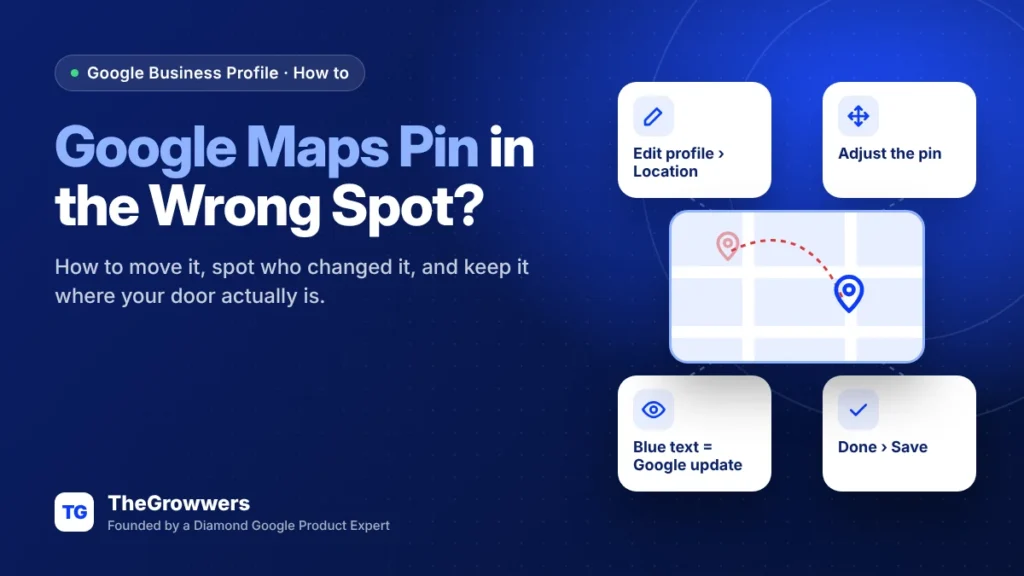
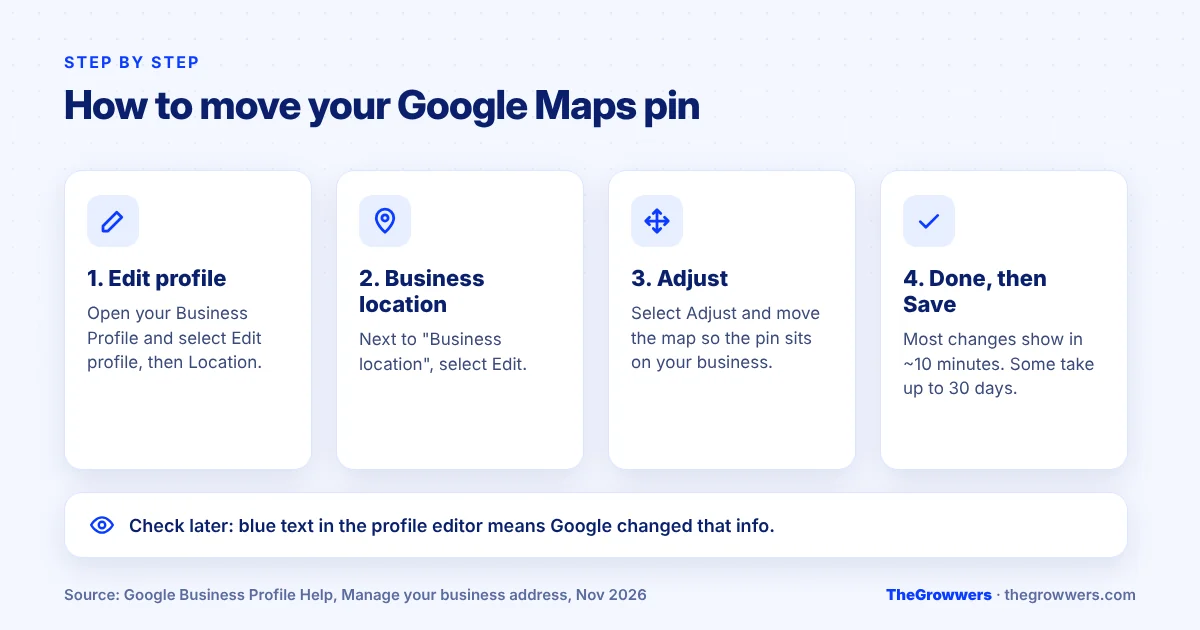
From your Business Profile, select Edit profile, then Location. Next to “Business location”, select Edit, then Adjust. Move the map so the pin points to your business, then select Done and Save. That’s the official path from Google’s Manage your business address help page.
- Go to your Business Profile (search your business name while logged in, or open it in the Google Maps app).
- Select Edit profile, then Location.
- Next to “Business location”, select Edit.
- Select Adjust.
- Move the map so the pin sits on your business. Zoom in. Satellite view helps.
- Select Done, then Save.
Zoom all the way in before you drop it. “Close enough” at city zoom can be a block off at street level.
Then wait. Google says changes usually take about 10 minutes, but in some cases up to 30 days while the edit is reviewed.
What if Google can’t find your address at all?
Google’s guidelines say to enter a complete street address with suite, floor or unit info. If your address has no street number, or the system can’t find it, you can pin your location on the map instead. Avoid descriptions like “Corner of Main St. and Broadway Ave.” in the address field.
A few address rules from Google’s help page that help the pin land right:
- Use a full street address, for example 1600 Amphitheatre Parkway, Mountain View, CA, 94043.
- Include building, suite and floor numbers.
- Only include info that’s part of your official address. Where the official address isn’t accurate, you can add nearby cross-streets or landmarks.
- If you get a warning, re-enter the parts highlighted in red. If it still fails, use Adjust to set the pin.
Inside a mall or another business? Google says you can request to have that shown on your profile. And the small “location description” some profiles show (a landmark or nearby business) can’t be edited.
How do you know if someone else moved your pin?
Open your profile editor and look at the colors. Google says blue text shows info changed by Google, and black or white means no Google updates. If there are Google updates, you’ll also see a notification at the top of the page.
Suggested edits are a separate path. Google says that when a user’s suggestion needs your review, you’ll get an email or in-product notification, and you have 4 days to accept or reject it. If you don’t respond, Google may publish it if it’s backed by other public info, like your website. (We explained this in detail in our guide to the 4-day rule.)
And one more thing from Google’s Understand Google updates page: Google may apply user edits without prior review when they’re needed to meet policy guidelines. So not every change will come with a heads-up.
Our read? Check your location once a month. It takes 30 seconds, and it’s much cheaper than finding out from a customer standing in the wrong parking lot.
How do you stop your pin from moving again?
You can’t lock it, but you can make your correct location the easiest one for Google to confirm. Keep the address identical everywhere, make sure your website shows the same address, respond to suggested edit notices within 4 days, and fix any blue-text Google updates directly in your profile.
- Match your website. Google says an unreviewed suggestion can go live if it’s supported by public info such as your website. So your site should show the exact same address.
- Turn on notifications. If suggested-edit emails go to an old inbox, you’ll miss the 4-day window.
- Keep the manager list clean. More people with access means more chances for an accidental edit.
- Re-check after big changes. New suite, rebrand, moved office? Check the pin the same day.
Worried that repeated edits could cause bigger trouble? It’s a fair question, and we looked at it in can “suggest an edit” cause a GBP suspension.
What about wrong directions and Street View?
These are fixed separately. Google says you can edit your map pin to tie your business to a more accurate Street View image, report outdated satellite or Street View imagery through a form, and report incorrect driving directions in Google Maps. Google can’t commit to a timeline for imagery updates.
| Problem | Fix |
|---|---|
| Pin in the wrong spot | Edit profile, Location, Adjust |
| Street View shows the wrong storefront | Edit the pin so it matches a more accurate Street View image |
| Street View or satellite is outdated | Report outdated imagery (no set timeline) |
| Driving directions go to the wrong entrance | Report wrong directions in Google Maps |
| Want a better look inside | Publish your own Street View imagery with Street View Studio |
Should a service-area business worry about the pin?
Less so. If you don’t serve customers at your address, Google says you can hide it and list your service area instead. Google is clear that you should only hide your address if you’re a service-area business. If you hide it without entering a service area, Google picks a local area for you, which you can edit later.
Not sure which you are? Our post on service-area business vs storefront breaks down Google’s address rules.
Final thoughts
A wrong Google Maps pin is one of the simplest profile problems to fix, and one of the easiest to ignore. Fix it, zoom in, save it, then check it again in a few days.
If the pin keeps moving back, or the edit won’t stick, that’s usually a sign something else is off with the profile. Our local SEO team can dig in, or reach out for a free consultation.
Frequently asked questions
How do I fix the location pin on my Google Business Profile?
Open your Business Profile, select Edit profile, then Location. Next to “Business location”, select Edit, then Adjust. Move the map until the pin sits on your business, then select Done and Save. You can also do this from the Google Maps app under Business.
How long does it take for a new Google Maps pin to show?
Google says profile changes usually take about 10 minutes to show up. In some cases they can take up to 30 days while the edit is reviewed. If it’s still pending after that, check for notifications in your profile.
Why did my Google Maps pin move by itself?
Google updates profiles using info from sources like user reports and licensed content. A user may also have suggested a change. In your profile editor, blue text shows info Google changed. Fix the location directly and make sure your website shows the same address.
Can someone else move my business pin on Google Maps?
Users can suggest edits to your profile. When a suggestion needs your review, Google says you get 4 days to accept or reject it, and it may be published if you don’t respond and other public info supports it. Google may also apply some edits without review to meet policy.
What if Google can’t find my business address?
Re-enter the parts highlighted in red. If Google still can’t find it, select Adjust and place the pin manually. Google’s guidelines say to use a complete street address with suite or unit info, and to avoid descriptions like “corner of” in the address.
Does the pin affect Street View for my business?
Yes. Google says you can edit your map pin to associate your business with a more accurate Street View image. If the imagery itself is outdated, you can report it, but Google can’t commit to a timeline for updates.