
On this page
- Which verification methods does Google offer in 2026?
- Phone, text and email verification
- How does Google Business Profile video verification work?
- Service-area businesses and video
- Postcard verification: still alive, still slow
- New: “Submit a business photo” verification
- New: government ID verification
- Why can’t I choose my verification method?
- What if no verification option shows up?
- How long does Google Business Profile verification take?
- Mistakes that get verification rejected
- Final thoughts
- Frequently asked questions
- What are the ways to verify a Google Business Profile?
- Can I choose a different verification method?
- How long does Google Business Profile video verification take?
- Is the government ID verification for Google Business Profile real?
- What does “Submit a business photo” verification require?
- Why is my postcard verification code not working?
- Can someone else verify my business for me?
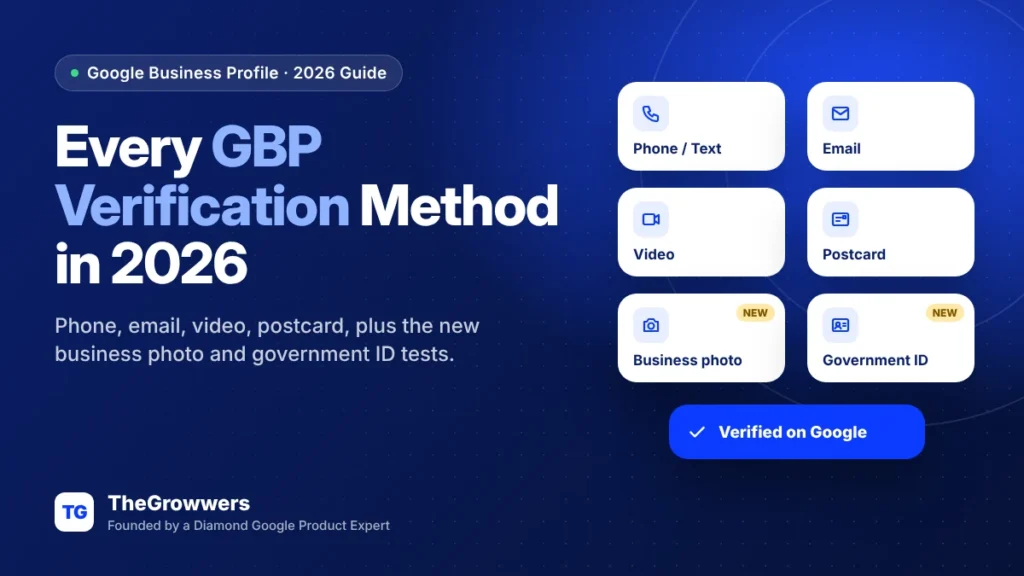
In 2026 you can verify a Google Business Profile by phone or text, email, live video call, video recording or postcard, and Google is now testing two more: submitting a business photo and uploading a government ID. You don’t get to pick. Google decides which of these methods your profile is offered.
And that’s the part that drives people crazy. One business gets an instant text code. The business next door gets a postcard that takes two weeks, or a video request they can’t pass because their sign is on order.
So this guide goes through every Google Business Profile verification method we know about right now. What each one asks for, what trips people up, and what to do when the option you need just isn’t there.
Last updated: October 2026
Key takeaways
- Google picks your verification methods based on business type, public info, region and hours. You can’t switch them.
- Video verification is Google’s recommended method when it’s offered.
- Two newer options are showing up in tests: Submit a business photo and government ID upload. Neither is in Google’s help doc yet.
- Google says reviews take up to 5 business days. Postcards take up to 14 days to arrive and expire after 30.
- Don’t edit your name, address or category while you wait. It’s the most common way people break their own verification.
Which verification methods does Google offer in 2026?
Google’s official verification help page lists phone or text, email, live video call and postcard, plus a recorded video option for eligible businesses. On top of that, two new methods have been spotted in testing: a business photo and a government ID.
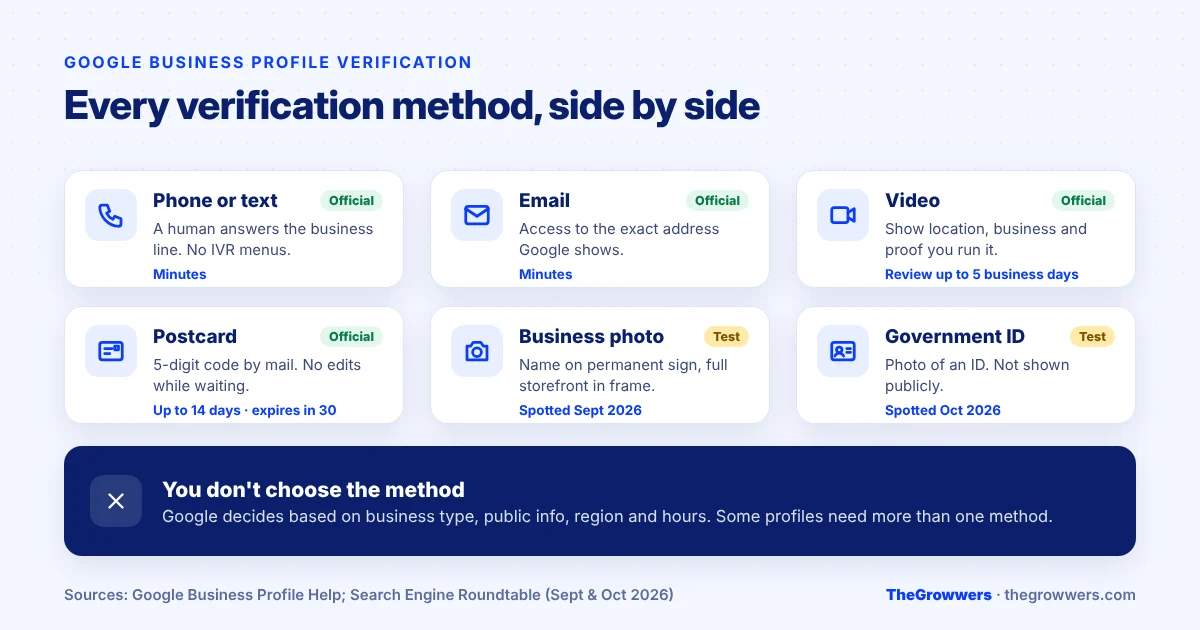
Here’s the quick version before we go one by one:
| Method | What you need | Typical speed | Status |
|---|---|---|---|
| Phone or text | Answer the business phone or get the SMS. No automated phone menus. | Minutes | Official |
| Access to the exact email address Google shows | Minutes | Official | |
| Video recording | A short video showing location, business and proof you run it | Up to 5 business days review | Official, recommended |
| Live video call | Be at the business, during business hours, on a device with a camera | Same session, then review | Official |
| Postcard | A mailing address that actually receives mail | Up to 14 days to arrive | Official |
| Submit a business photo | A photo of your storefront with the business name on permanent signage | Unknown | Test (Sept 2026) |
| Government ID | A photo of a government-issued ID | Unknown | Test (Oct 2026) |
Phone, text and email verification
These are the easy ones, if you get them. Google sends a code, you type it into your profile, done.
Two catches though:
- The phone has to be answered by a human. Google says the code can’t be received by automated phone systems (IVR). If your main line goes to “press 1 for sales,” the call will fail. Use the text option, or temporarily forward the line to a mobile.
- Email has to be the address Google shows you. Not your personal Gmail. If the screen shows info@yourdomain.com and you don’t have access to that inbox anymore, sort that out first.
And please, never share the code with anyone. Google says it will never ask you for it, and that includes people who “manage your profile.” If someone calls claiming to be from Google and asks for the code, that’s a scam. Hang up.
How does Google Business Profile video verification work?
Video verification is the method Google recommends when it’s available. There are two versions: a recorded video you upload, and a live video call with a Google representative. Both are basically asking you to prove three things on camera.
- Where you are. Outside signage, the street sign, neighboring businesses.
- That the business is real. Products, branded gear, tools, equipment.
- That you’re the one running it. Unlocking the door, an employee-only area, the register, the kitchen or stockroom, or non-sensitive business documents.
Live calls only work during your listed business hours and you have to be physically at the business. You start in a text chat, then the rep joins a video call when they’re ready.
Honestly, the easiest way to fail is a video that’s too short or too shaky to show all three of those things. Do one continuous take. Start outside with the street in view, walk in, show the work, show something only an owner could open. If you get a “Review issues” notice, your video wasn’t accepted. Select it, read what Google wants, and record again.
Service-area businesses and video
No storefront? You still need to show the business exists. Branded vehicle, tools, equipment, business documents, and the place you actually operate from. A plumber filming an empty home office with no tools in sight is going to have a hard time.
Postcard verification: still alive, still slow
Postcards haven’t gone away. Request one, and Google says most codes arrive within 14 days. The code expires after 30 days.
The rules that matter:
- Don’t edit your business name, address or category while waiting. Google says the code won’t work if you do.
- Don’t request a new code because the first one is “taking too long.” A new request cancels the old one and you start the clock over.
- Enter the 5-digit code in your profile and hit Submit. That’s it.
New: “Submit a business photo” verification
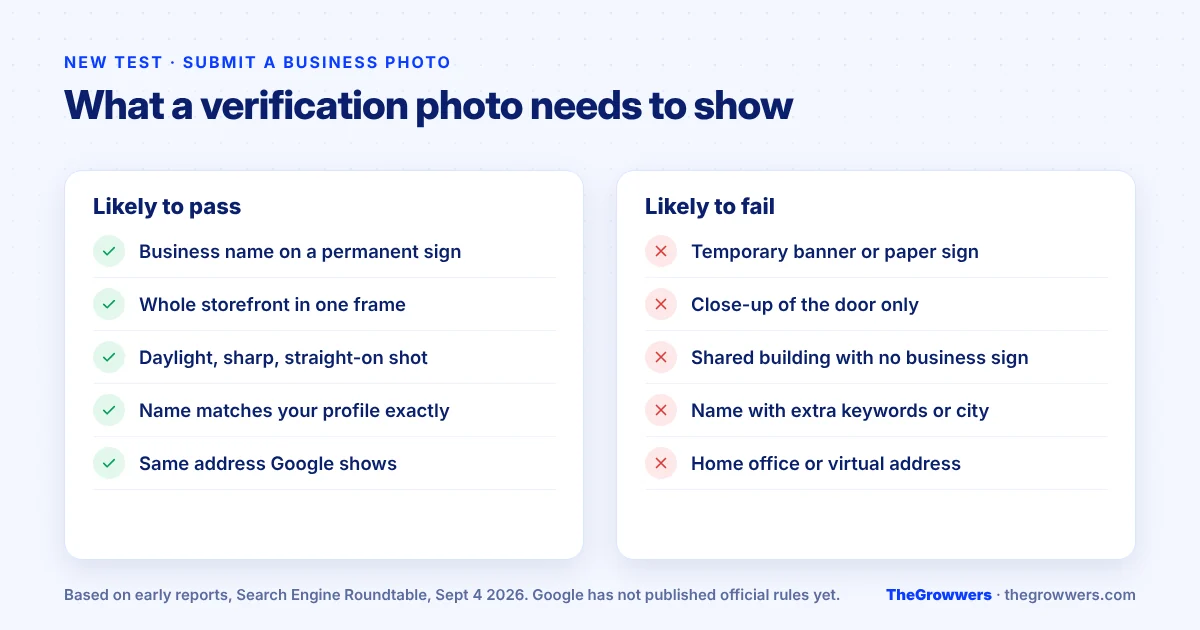
In early September 2026, Ben Fisher spotted a new option called “Submit a business photo” appearing in the verification flow, which Search Engine Roundtable reported on September 4.
From what’s been shared, the photo needs to show your business name on a permanent fixture (like a proper sign, not a banner taped to a window) and the whole storefront in one frame.
Our read? This is great news for storefront businesses with good signage. It’s basically the outside shot from a video verification, without the video. It won’t help a home-based or service-area business, and it’ll catch anyone who’s been trying to verify a location that doesn’t really have a sign.
New: government ID verification
This one’s newer and stranger. On October 20, 2026, Search Engine Roundtable reported a verification step called “Submit an Identity Verification,” asking the person to upload a photo of a government ID. It was first spotted by Digital Jedi on the Local Search Forum.
The screen says the ID is only used for verification and won’t be shown publicly. Google hasn’t added it to the help page and hasn’t explained which IDs count.
The obvious question, and the forum asked it too: how does Google know the ID is connected to the business? A driver’s license proves who you are. It doesn’t prove you own the bakery. One theory is that it’s linked to how Local Services Ads checks certain professionals, but that’s a guess, not something Google has confirmed.
Here’s what we’d do if you see it:
- Make sure you’re actually on business.google.com or in Google Search/Maps, not a lookalike page. Scammers love “verify your ID” screens.
- Use your own ID, matching the person who will own the profile.
- Don’t upload someone else’s ID because “the owner is busy.” That’s how ownership fights start later.
Why can’t I choose my verification method?
Because Google doesn’t let you. The help page is clear: the methods you see are set automatically, based on your business type, the public information Google has about you, your region and your business hours. Some businesses even have to complete more than one method.
Things that can push you into harder methods, usually video:
- A brand new business with almost nothing about it online yet.
- Categories Google sees a lot of spam in. Locksmiths, garage doors, movers, plumbers, that kind of thing.
- A business name, address or phone that doesn’t match your website.
- Lots of recent edits to the profile.
The fix is boring but it works. Build up real proof first. A website with your exact name, address and phone. Signage. A few citations on the big directories. Then verify.
What if no verification option shows up?
Sometimes there’s nothing. Or there’s an error that says there are no more ways to verify. Google’s advice is to contact Business Profile support if you can’t use any of the options shown.
We wrote a full guide on this exact situation: Google Business Profile “No More Ways to Verify” issue and how to fix it. Start there.
How long does Google Business Profile verification take?
Google says it reviews verification within up to 5 business days, and rarely longer. Phone, text and email codes usually take effect quickly. Postcards add up to 14 days of mail time before you can even enter the code.
Some profiles verify instantly. Google mentions two cases: website verification through Google Search Console, and bulk verification for businesses with 10 or more locations.
Once you’re verified, you get a confirmation email. That’s when you can add managers and owners, and when your edits start showing up properly.
Mistakes that get verification rejected
- Editing during verification. Name, address, category. Leave them alone until it’s done.
- Keyword-stuffed business name. “Smith Plumbing – Best Plumber Dallas” doesn’t match your sign, so it fails video and photo checks.
- Virtual offices and coworking addresses. If you can’t show a real, staffed location, you’ll struggle.
- Requesting codes over and over. Each new one cancels the last.
- Letting a “helper” do it with their own account. Then they own your profile. Verify under an account you control, and add people as managers after.
If verification went wrong and the profile ended up suspended, that’s a different process. Our GBP reinstatement page explains how we handle those.
Final thoughts
Google Business Profile verification has more options than ever in 2026, but you still don’t get to choose. Phone and email when you’re lucky, video when Google wants proof, a postcard when it’s old school, and now photo and ID tests on the side.
The businesses that sail through are the ones that look real before they ask. Matching details everywhere, proper signage, and nobody poking at the profile mid-verification.
Stuck on verification, or tired of failed videos? Our local SEO team can look at your profile. Get a free consultation and we’ll tell you what’s blocking you.
Frequently asked questions
What are the ways to verify a Google Business Profile?
Google offers phone or text, email, live video call, recorded video and postcard verification. Two newer options are being tested in 2026: submitting a photo of your business and uploading a government ID. Google chooses which methods you see based on your business type, public information, region and hours.
Can I choose a different verification method?
No. Google sets the available methods automatically and doesn’t let you change them. If more than one option appears, you can pick between those. If the one shown doesn’t work for you, improving your public information (website, signage, matching details) is the only real way to influence it, and Google may still ask for video.
How long does Google Business Profile video verification take?
After you submit a video, Google says it reviews verification within up to 5 business days, and rarely longer. A live video call happens in one session with a Google representative, though review can still take a few days. If you see “Review issues,” your video was rejected and you’ll need to record again.
Is the government ID verification for Google Business Profile real?
It has been spotted in testing and was reported in October 2026, but it isn’t in Google’s official help documentation yet. The screen says the ID is only used for verification and won’t be shown publicly. Only upload an ID on a genuine Google page, and only your own.
What does “Submit a business photo” verification require?
From early reports, the photo should show your business name on permanent signage and the entire storefront in a single frame. It suits storefront businesses with proper signs. Google hasn’t published official requirements for this option yet, so it may still be a test.
Why is my postcard verification code not working?
The usual causes are editing your business name, address or category after requesting the postcard, requesting a newer code (which cancels the older one), or a code older than 30 days. Request one fresh postcard, make no edits, and enter the code as soon as it arrives.
Can someone else verify my business for me?
They can, but whoever verifies with their Google account becomes the owner. It’s safer to verify under an account your business controls, then add your agency or staff as managers. Never share your verification code, Google says it will never ask you for it.