
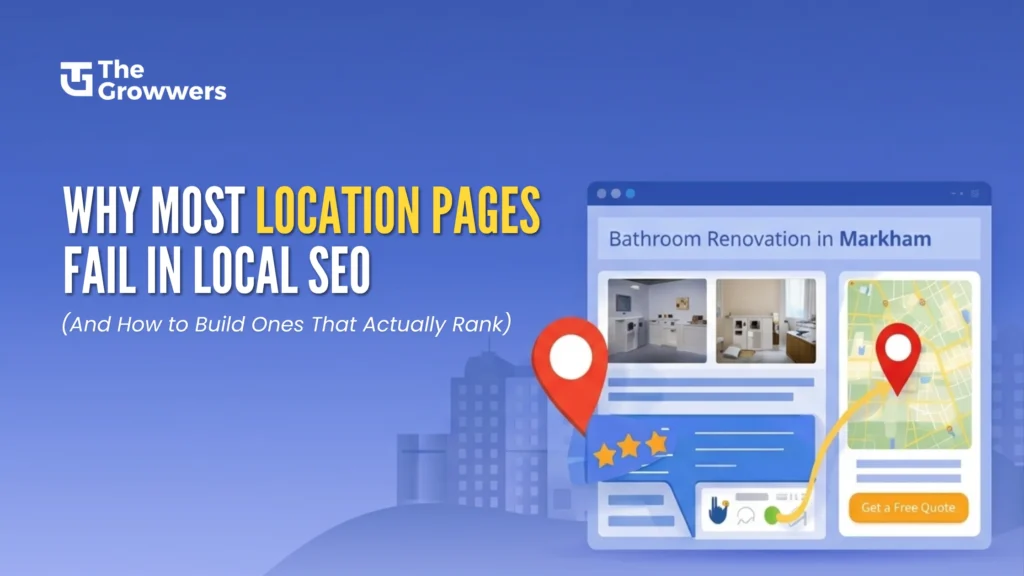
The location pages of your business provide the strongest advantages for your local SEO efforts when your business serves multiple regions. The majority of their locations show no ability to attract visitors who will become customers because they have not developed proper marketing strategies.
You might already have pages targeting keywords like “kitchen renovation in Markham” or “appliance repair in Houston,” but if they are not performing, the issue is rarely competition alone. The main problem arises from inefficient planning.
The main reason location pages do not succeed is that they provide minimal content, which contains duplicated information and fails to deliver useful content for visitors. Google has evolved beyond keyword stuffing. The search engine now gives preference to content that demonstrates relevance and authority while providing users with a positive experience.
The guide provides an explanation of why location pages fail and shows the process for creating location pages that achieve high rankings and produce steady local customer leads.
What Is a Location Page in Local SEO
A location page functions as a dedicated website page that targets a specific geographic region where your business operates.
Examples include:
- Bathroom renovation in Markham
- Dental clinic construction in Toronto
- Refrigerator repair in Houston, TX
The purpose of these pages is to achieve high rankings for location-based search queries while they draw users who search for services available in particular regions.
Why Most Location Pages Fail
1. Duplicate or Thin Content
The most frequent problem for businesses appears to be this particular issue.
Multiple businesses create numerous web pages that only change the city name. The structure, content, and messaging remain identical.
Example:
- “We provide the best renovation services in Markham.”
- “We provide the best renovation services in Richmond Hill.”
Google detects this as duplicate content, which decreases its ranking potential.
Google treats this content as duplicate material, which leads to a decrease in its ranking ability.
The system fails because it provides users with no distinctive advantages, it has inefficient crawling systems, and it generates minimal user interaction signals.
2. No Local Relevance or Context
Google wants proof that you actually serve that location.
If your page does not mention:
- Local landmarks
- Nearby neighborhoods
- Real projects
- Customer testimonials from that area
Then it lacks geographic relevance.
3. Weak Keyword Strategy
Multiple webpages attempt to reach broad audiences through highly competitive search terms because they lack comprehension of user search intentions.
For example:
The website neglects to use long tail keywords, which include “affordable kitchen renovation in Thornhill.”
The website targets the keyword “home renovation,” while their actual focus should be “home renovation in Markham.”
4. Poor User Experience
Even if your page somehow manages to rank, it won’t be worth it if:
- Users get frustrated because your page takes ages to load
- It looks like a mess on mobile devices
- You’re not making it clear what you want users to do next
- It’s hard for people to find what they’re looking for
The fact is, Google pays close attention to how users behave on your site. If they’re bouncing off in droves, don’t be surprised if your rankings take a hit.
5. No Supporting Authority Signals
A single location page isn’t going to get far on its own without some support.
Some of the key things that are often missing include:
A solid internal linking structure
- Backlinks from other local websites
- Optimised Google Business Profile
- A solid internal linking structure
How to Build Location Pages That Actually Rank
Now let’s move to what works.
1. Create Truly Unique Content for Each Location
Do not use existing templates to create your content.
Each page should include:
- Specific services offered in that area
- Real project descriptions
- Location-based challenges or insights
Example:
Instead of writing:
“We provide renovation services in Markham.”
Write:
“In Markham, many homes require layout optimization due to older floor plans. Our renovation approach focuses on maximizing space while maintaining modern aesthetics.”
The combination of these two elements creates something that brings additional value to the content.
2. Use Location-Specific Keywords Strategically
The main keywords need to be placed throughout the content in a way that maintains its natural flow.
Primary keyword examples:
- Bathroom renovation in Markham
- Appliance repair in Houston, TX
Secondary keywords:
- Same-day appliance repair in Houston
- Affordable renovation in Markham
Where to include keywords:
- Title tag
- H1 heading
- First 100 words
- Subheadings
- Image alt text
The text needs to maintain its natural flow, while readers should find it easier to understand the content.
3. Show Actual Proof of Work
Real results create the strongest trust among people.
The following elements should be included
- Project images
- Before and after comparisons
- Case studies
Image Recommendations:
- Before and after renovation photos
- Team working on site
- Completed projects in that location
Alt Text Example:
“Bathroom renovation project in Markham with modern tile design.”
4. Embed Google Maps and Local Signals
The implementation of a map increases the geographical accuracy of your business operations.
Include:
- Embedded Google Map
- Business address
- Service areas
The system uses this information to link your establishment with the specified territory.
5. Build Strong Internal Linking
Your location pages need to establish links to:
- Main service pages
- Blog content
- Related locations
Example:
A Markham renovation page can link to:
- Kitchen renovation services
- Bathroom renovation blog
- Richmond Hill location page
This strategy enhances both website scanning capabilities and search engine optimization power.
6. Include Location-Based Testimonials
Generic reviews do not sell.
Instead, use:
- “We hired them for our kitchen remodel in Markham, and the result was superb.”
This is building trust and keyword relevance.
7. Don’t Just Rank – Optimize for Conversions
Ranking is only half the job.
Your page should include:
- Clear CTA buttons
- Contact forms
- Phone number visibility
- Service highlights
CTA Examples:
- Book a free consultation
- Get a quote on your project
- Call now for same-day service
8. Employ Structured Data Markup
Schema allows search engines to better comprehend your content.
Apply the following schema types where applicable:
- Local Business schema
- Service schema
- Review schema
This can enhance visibility in the search engine results page.
9. Send Supporting Content
Location pages do better when backed by blogs.
Example Blog Topics:
- Cost of bathroom renovation in Markham
- Common appliance issues in Houston homes
- Best materials for kitchen renovation in Thornhill
This builds topical authority.
10. Build Local Backlinks
Backlinks maintain their essential role in online marketing.
The project requires you to concentrate on these three areas:
- Local directories
- Business listings
- Partnerships
- Guest posts
The presence of even two high-quality local links will deliver substantial ranking improvements.
Example Structure of a High-Ranking Location Page
H1:
- Bathroom Renovation in Markham
The sections of the document include:
- Contact Section
- Introduction
- Why Choose Our Services in Markham
- Our Renovation Process
- Recent Projects in Markham
- Services We Offer
- Customer Testimonials
- FAQs
Visual Content Suggestions
For engagement and SEO enhancement:
1. Images
- Before and After
- Team at Work
- Completed Interiors
2. Infographics
- Process of renovation
- Cost breakdown
3. Videos
- Walkthrough of Completed Projects
- Client Testimonials
Since video content leads to longer time on page, your rankings will improve as well.
Internal and External Linking Strategy
1. Internal Links:
- Link to service pages
- Link to related blogs
- Link to other locations
2. External Links:
Link to authoritative sources like:
- Government building guidelines
- Industry standards
- Material suppliers
This builds credibility.
Common Mistakes to Avoid
- Copy and pasting content across multiple locations
- Disregarding mobile responsiveness
- Keywords stuffing
- Content Isn’t Regularly Updated
- Disregard user intent
On Page SEO Checklist
1. Title Tag:
Add primary keyword + city
Example:
Bathroom Renovation in Markham | Modern Design Experts
2. Meta Description:
Just make sure it’s compelling, and you have included your keywords
Example:
Need a bathroom renovation in Markham? Browse the best modern homes, handcrafted furniture, and solutions, or get a FREE quote today.
3. Headings:
H1 and H2 and H3 in the right way
4. Images:
- Use compressed images
- Add descriptive alt text
5. URL Structure:
Make them simple
Example:
yourwebsite.com/bathroom-renovation-markham
6. Mobile Optimization:
Fast loading and responsive design
Final Thoughts
Most of the time, location pages fail because they are written for the search engines rather than the user.
When you concentrate on genuine value, local relevance, and good SEO fundamentals, your pages won’t just rank – they’ll convert, too.
Key Takeaways:
- Avoid duplicate content
- Concentrate on location-specific value
- Use strategic keywords
- Provide real proof and testimonials
- Optimize for both ranking and conversion
By using these techniques on a regular basis, your location pages can become a true organic lead generation powerhouse.
FAQs (Frequently Asked Questions)
-
Why is Google not ranking my location pages?
Most location pages don’t work because they have duplicate content, insufficient keyword targeting, and a lack of local relevancy. Google favors pages that provide unique, location-specific information and that have strong user engagement signals.
-
How do I create SEO friendly location pages?
Concentrate on the distinctiveness of content, naturally use location-based keywords and modify as needed, add local testimonies to the web page, embed Google Maps, and make sure the content is mobile-friendly. And be sure to have solid internal links and a quick page load speed.
-
How many local pages should I have?
You only want to make a page for each location that you really want to serve, and you want to be sure you can provide unique and useful information on each. Don’t build pages just to target more cities.
-
What keywords should I target for location pages?
Target primary and long tail keywords list, such as “service + city/town” along with modifiers such as “budget,” “PDQ,” or “Registered technician.” Always ensure that the keywords match user intent.
-
Can location pages provide leads or traffic only?
Location pages can be a good source of both traffic and conversions if you get the optimization right. Including prominent CTAs, contact forms, and trust indicators such as testimonials has a big impact on lead generation.