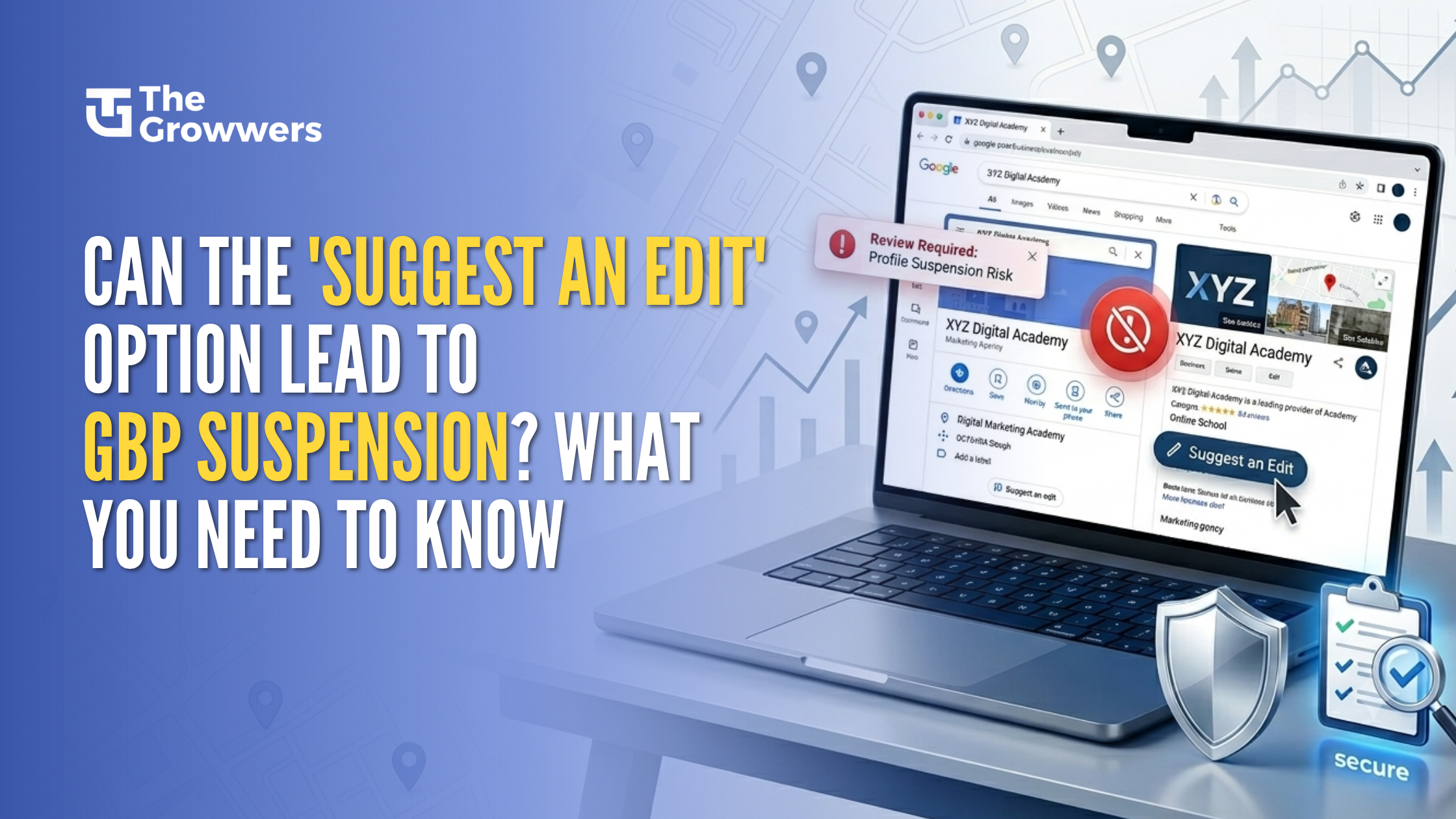

Your Google Business Profile plays a major role in helping customers find your business online. But what happens if someone uses the Google Maps “Suggest an Edit” feature to report your listing or make changes to your business details? Can a simple public edit lead to a Google Business Profile suspension?
The answer is not as straightforward as many business owners think. While a Suggest an Edit does not directly cause a suspension, it can trigger a review of your listing, where Google may identify existing guideline violations or inaccurate information. In this blog, we will explain how the Suggest an Edit option works, when it can become a risk, and how you can protect your profile from unexpected suspension.
What Is the Google Maps “Suggest an Edit” Feature?
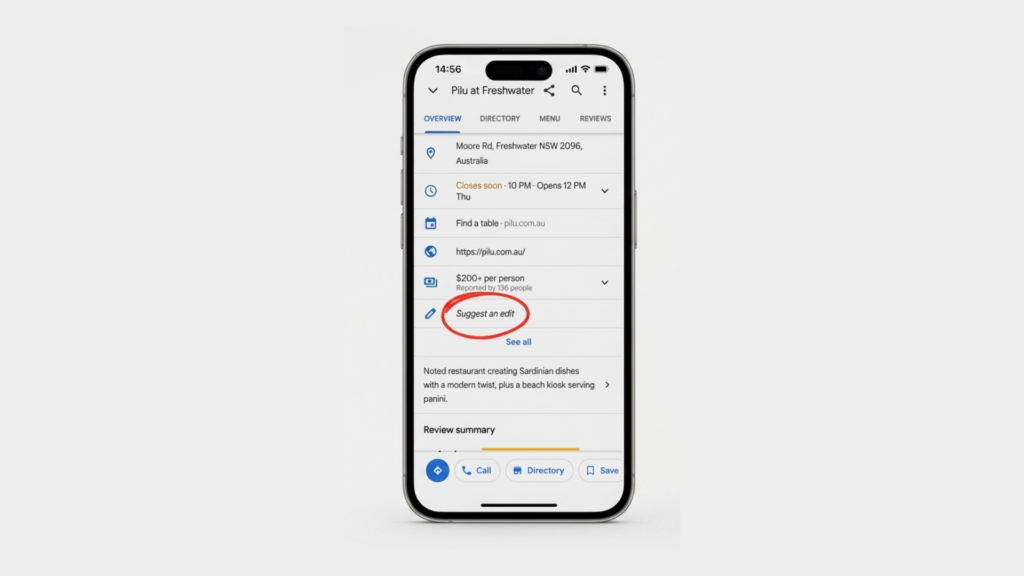
The Google Maps “Suggest an Edit” feature allows anyone with a Google account to recommend changes to a business listing. These changes may include updating the business name, address, phone number, website, hours, or marking a business as closed, moved, or non-existent. Google introduced this feature to keep business information accurate and helpful for users searching on Google Search and Maps.
However, not every suggested edit is automatically approved. Google reviews these submissions using automated systems and other quality checks before deciding whether to apply the changes. While the feature helps maintain accurate listings, unauthorized Google Business Profile edits or false reports can sometimes trigger a review of a listing. If Google discovers violations of its Google Business Profile guidelines during that review, it may contribute to a Google Business Profile suspension.
Can Anyone Edit My Google Business Profile?
Yes , competitors can use the Google Maps “Suggest an Edit” option to report your place or try to tweak your business data a bit. Still, it’s not like every report immediately ends in a Google Business Profile suspension, because Google actually checks the proposed changes first, then decides what to do.
That said , false or not-authorized edits to your Google Business Profile can still put your listing under review. So this is why you should keep an eye on your profile consistently, keep the details accurate, and stick to the Google Business Profile guidelines, in order to lower the chance of suspension.
Can a “Suggest an Edit” Really Cause a Google Business Profile Suspension?
Yes, one of those annoying “Suggest an Edit” requests on Google Maps can actually set off a chain of events that might just lead to your Google Business Profile getting suspended – but only if Google finds some issues with your listing. The thing is, a suggested edit ( or even a spam report) can get Google to take a closer look at your profile. If they spot some wrong information, or a policy violation or two, your business listing could soon be in the bin.
Now, it’s worth noting that the “Suggest an Edit” button itself is rarely the reason behind a Google Business Profile suspension. What it often does is expose some underlying problems with your listing – like a business name that breaks the rules, a dodgy or fake address or even a couple of duplicate listings. Any of these things can be a major problem.
Take this example – someone flags your business as “Doesn’t Exist” or reports it as spam. Google might then check if your business really is the real deal, and whether or not your business info matches up with their guidelines. If you’re spot on and in compliance, then you should be fine.
Which is exactly why keeping on top of your Google Business Profile and updating your business info when you need to is such a big deal. By following Google’s rules you can help prevent any issues with your listing and keep your online presence looking healthy.
Which Types of Suggest Edits Are Most Likely to Put Your GBP at Risk?
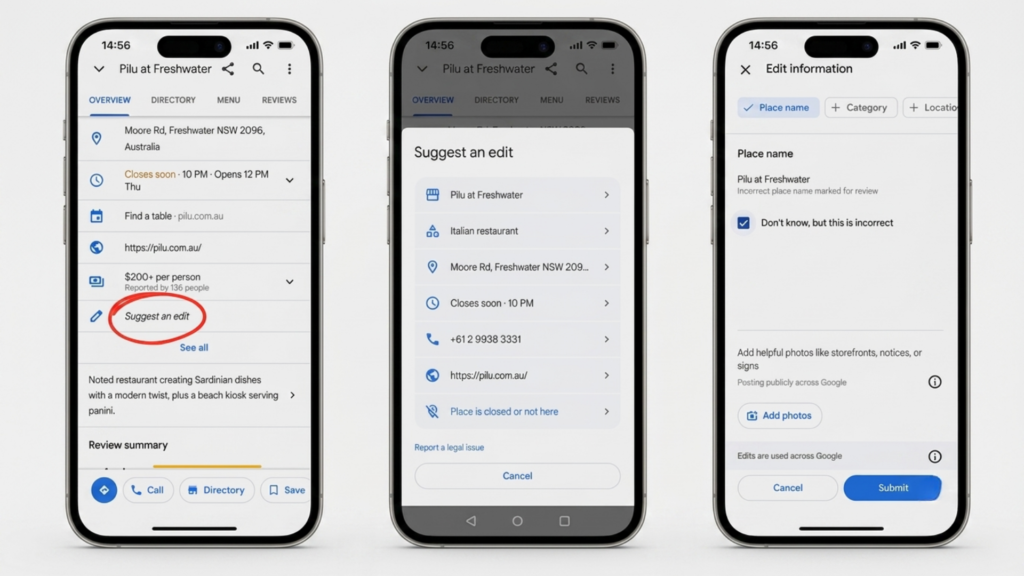
Not every Google Maps “Suggest an Edit” is out to get you. Most are just people trying to help update some out-of-date business information. That said, certain types of edits can raise a red flag with Google, and land you in hot water – especially if they seem to be asking more questions than they’re answering.
1. Marking Your Business as ‘Doesn’t Exist’
If someone reports that your business doesn’t exist, Google will start to sniff around to verify whether you’re actually operating out of the listed address. And if they find any inconsistencies – maybe a dodgy address, some policy violations – you could find yourself facing a Google Business Profile suspension.
2. Flagging Your Listing as Spam
If you get reported as a spam business, Google will take a closer look at your listing to see if you’re up to any funny business. That might include things like keyword stuffing, fake locations, duplicate profiles or making out like your business is something it’s not. The good news is that a genuine business sticking to the rules has a lot less to worry about here.
3. Changing Your Business Name
Changing your business name might seem like a harmless edit, but it can be a problem if you’re tacking on unnecessary keywords or don’t quite match up with your real-world identity. This is a pretty common reason for businesses getting their Google Business Profile taken away.
4. Editing Your Address or Business Category
Fiddling with your address or main business category might seem like a minor edit, but it can actually cause some real problems if the details get updated with wrong information, an ineligible location or a business category that doesn’t even fit what you do. At this point, Google might well start to dig a bit deeper.
5. Marking Your Business as Closed or Moved
If some user thinks your business has bitten the dust or moved on, that’s not going to go down too well with Google. Now they might just accept it without question, but the fact is that these reports can cause a bit of confusion and may prompt Google to take a closer look at your business information to make sure it’s all ticking along as it should be.
What’s key to remember is that a “Suggest an Edit” isn’t the cause of a Google Business Profile suspension in itself. It’s more like a canary in a coal mine – it’s a signal that might make Google take a closer look. So the best thing to do is to keep your GBP information in order and follow Google’s guidelines – that way, you’re a lot less likely to run into trouble.
Can Competitors Use the Suggest an Edit Option Against Your Business?
Yes, competitors can use the Google Maps “Suggest an Edit” option to flag your business listing or push changes to the way your info looks. But just to be clear, a report usually doesn’t mean your Google Business Profile is instantly suspended, because Google does review what people submit first, before it takes any sort of action.
Still, even a false or unauthorized edit can end up triggering a further look at your profile. So it’s smart to keep an eye on your listing often, keep everything consistent and correct, and stay aligned with the Google Business Profile guidelines, so you reduce the chance of suspension and other complications.
Why Your Google Business Profile May Get Suspended After an Edit?
A Google Business Profile suspension after a “Suggest an Edit” usually comes up because that edit makes Google go back and check everything, and then they start spotting problems. The edit itself isn’t really the thing that suspends you, more like it becomes the spark that triggers a review. From there, Google might take action if your profile breaks their rules, or if some info turns out to be off, or honestly just not consistent.
A few of the more common reasons a suspension happens are basically these:
1. Inaccurate business details
If your business name, address, phone number , website, or business hours are wrong or don’t match reality, your profile can start looking untrustworthy.
2. Keyword Stuffing in the business name
If you toss in extra keywords to help ranking, like trying to stuff “best plumbing near me” into the name, that can violate Google Business Profile guidelines and raise the odds of a suspension happening.
3. Duplicate or “fake” style listings
If you have multiple listings for the same company, or if the place you use as a location is somewhere your business doesn’t actually operate, Google may think your listing is not legit.
4. Wrong or misleading business categories
Picking categories that don’t really fit what you do can create confusion. And yes, it can also make your listing end up under extra scrutiny during review.
5. Frequent, or suspicious profile updates
If you keep changing important details-business name, address, category, things like that-over and over, it can look like unusual activity, and it may trigger more checks.
So, by making sure your information stays accurate, and by following Google Business Profile guidelines in general, you can usually reduce the chance of a suspension even if someone submits a public edit.
Hard Suspension vs Soft Suspension: What Is the Difference?
Not all Google Business Profile suspension cases are treated the same, at least not in practice. Google may put you under a hard suspension or a soft suspension, depending on what they find going on with your listing. If you can tell which one you’re dealing with, it gets easier to spot the issue and then pick the right path for Google Business Profile reinstatement, kind of like figuring out which door actually opens.
Hard Suspension
A hard suspension means your Google Business Profile gets taken off Google Search and Google Maps. In other words, it stops showing up for customers, so it is basically unavailable. This usually happens when Google flags serious guideline violations, or when they decide the business is not eligible for a profile in the first place.

Soft Suspension
A soft suspension is a bit different. Your business listing might still show up on Google Search and Maps, but you can not manage the profile anymore. You lose access to edit it, update it, or otherwise control it. This situation can come from ownership problems, verification concerns, or certain types of policy violations that don’t trigger removal.
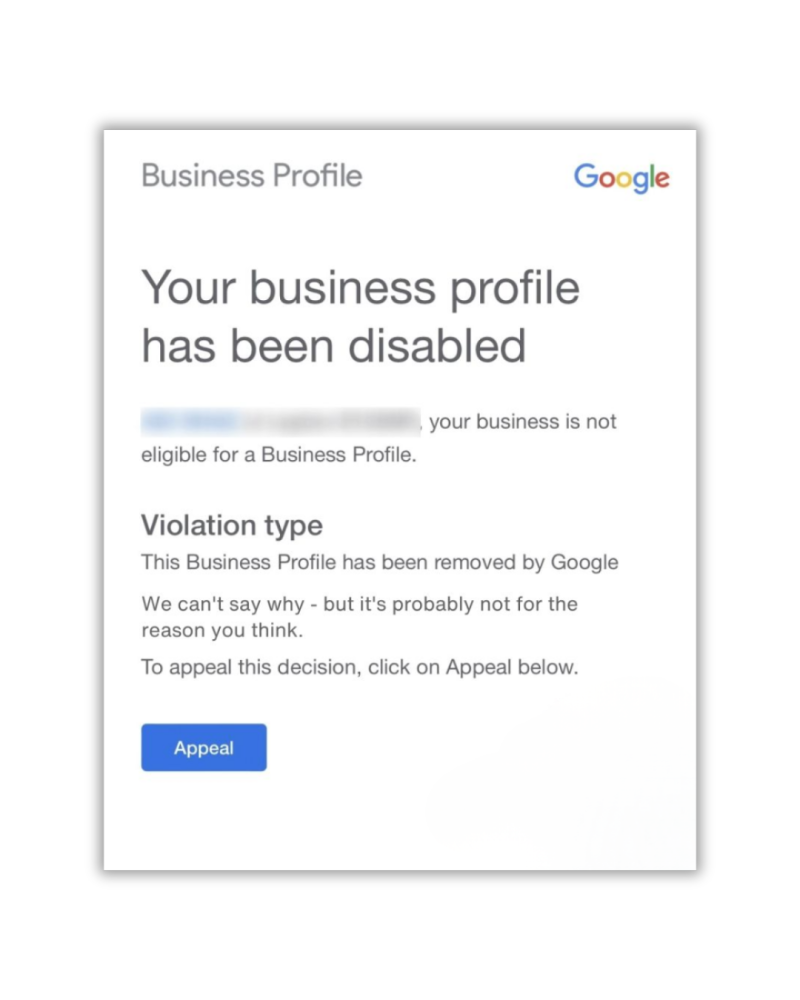
If you know whether your situation is a hard suspension or a soft suspension, you can better judge how severe the problem is. Then you can choose a recovery process that actually matches what Google did, rather than guessing and wasting time.
How to keep your Google Business Profile safe from random people making edits?
Because anyone can hit Google Maps with “Suggest an Edit” it’s important to keep an eye on your listing pretty often. You usually can’t fully block other folks from sending changes, but you can lower the odds of headaches by keeping things well managed, and sort of always in line with Google’s own rules.
1. Go through your business info, regularly
Take a look at your business name, street address, phone number, website, business hours, and those business categories. Make sure all of it stays accurate, and yes up to date. Even one small mismatch can turn into a bigger mess later.
2. Stick to Google Business Profile rules
Try not to do things like keyword stuffing, or using fake locations, or making duplicate listings. Those habits, even if you “didn’t mean it” can raise the chance of a suspension for your Google Business Profile.
3. Watch for changes and respond fast
If you spot unauthorized edits, or you see the info is wrong, fix it quickly. And when it matters, report the incorrect updates right away. Don’t wait around, because the wrong details can linger.
4. Keep your info matching everywhere online
Make sure your business details match on your website, on directories, and across other online profiles. When everything lines up, Google tends to trust you more. It also reduces confusion for customers who are trying to find you.
If you do these things you can protect your Google Business Profile from unnecessary trouble, wrong edits, and those suspension related risks.
What Should You Do If Your Google Business Profile Gets Suspended?
If it happens to you, don’t start making random tweaks, and don’t jump into creating a brand new listing right away. First try to figure out what might have caused the suspension, and make sure your profile is in line with Google Business Profile guidelines, before you even begin the reinstatement request part.
1. Review your business info and fix issues
Go back through your business name, address, phone number, categories, and the rest of your details. Look for wrong data, keyword stuffing, duplicates, or any other policy issues that could’ve tripped Google’s systems, even if it seemed small.
2. Gather supporting business documents
Collect proof that you’re a legit operation. things like business registration records, relevant licenses, or utility bills that line up with what you entered on your profile. This part matters because it backs up your appeal.
3. Submit a Google Business Profile reinstatement request
After you correct the problems and you have your evidence ready, send a reinstatement request through Google. Provide clear and accurate information, and match it to the documents you gathered, so Google can review your case.
4. Monitor your profile after reinstatement
Once your Google Business Profile is back, keep checking it. Make sure the details stay correct, and keep an eye out for any changes that might trigger another suspension risk later.
Google Business Profile suspension can hurt local visibility and customer confidence, but doing the right steps and following Google’s rules can make a real difference for recovery.
Pro Tips to Keep Your Google Business Profile Safe from Future Suspensions
It’s way better to be proactive than to try and sort out a suspension after it’s happened. Think about it, dealing with the aftermath is always a headache & you end up losing your local search visibility for a good while. Do the upkeep and follow the rules & your business listing will likely remain intact. Plus, you’ll get better local search results.
- First off – double check all the basics – business name, address, phone number, website & operating hours. Make sure all that info is bang on & matches what’s happening in real life. No “close enough” – that kind of fudge will come back to haunt you.
- Also, be kind to those elements once they’re set – business name, address, primary category, especially. Don’t go changing them willy-nilly. Google will sniff it out & next thing you know your business will be in for a “we need to review” – and that’s just a hassle.
- Now, when filling out your profile, just be honest – no dodgy details or keyword stuffing your business name. And for goodness sake, don’t go setting up half a dozen different listings for the same business. That just screams “I’m trying to pull a fast one on Google”.
- Get into a regular habit of checking your Google Business Profile. Not just once and then forgetting about it either. Keep an eye out for anyone making unauthorized edits or updating your data all willy-nilly. Snag those problems early on & they won’t get out of hand.
- Lastly – keep all your business info in sync across your website, social profiles, local directories & other places online. It builds trust & that pays off with better local SEO results.
Follow these tips & you’ll be way less likely to get a Google Business Profile suspension. And you’ll protect your online presence for years to come.
Conclusion
A “Suggest an Edit” on Google Maps may not be the direct cause of a Google Business Profile suspension, but it can actually set off some alarm bells & get Google to take a closer look at your listing to see if things aren’t quite right. The key to keeping your listing safe is to keep your business details spot on, follow the rules outlined by Google Business Profile, and keep a close eye on how your listing is looking.
Whether the edit comes from a disgruntled customer, a curious local resident or sneaky competitor, having a neat & tidy profile that’s all good to go has a way of keeping trouble at bay. By understanding how edits work & taking a few simple precautions, you can safeguard your Google Business Profile, keep your local SEO in good shape, and avoid all the hassle of having to get things reinstated.
Frequently Asked Questions
-
Can someone suspend my Google Business Profile by using “Suggest an Edit” ?
No, a person can’t directly suspend your Google Business Profile just because they used Suggest an Edit. Still, a report can trigger some kind of review, and Google may end up suspending the profile if it finds issues like guideline violations or business info that is not correct.
-
How can I tell if someone edited my Google Business Profile?
You can watch your Google Business Profile dashboard and also, check your public listing on Google Search and Maps regularly. This helps you spot unauthorized changes, or messed up business details before they become a bigger problem.
-
How do I stop my Google Business Profile from getting suspended?
To reduce the chances of a suspension, keep everything in your business profile accurate. Try not to do keyword stuffing, stick to Google’s guidelines, and keep reviewing the profile from time to time so you catch unauthorized edits early.
-
How long does the reinstatement process take for Google Business Profile?
The reinstatement timeline depends on how complicated the situation is, what evidence you submitted, and how Google handles the review. Some simpler cases are resolved quickly, but others take longer, maybe longer than you expect.
-
Can competitors edit my Google Business Profile?
Yes, competitors can submit suggestions via Google Maps using “Suggest an Edit” since it’s a public feature. But Google does review those suggestions first, before anything actually changes. So a suggestion alone usually does not automatically alter your listing.
-
Why was my Google Business Profile suspended in the first place?
Some frequent suspension causes include inaccurate business details, keyword stuffing, fake or misleading locations, duplicate listings, or other violations of the Google Business Profile guidelines.